









Ctrl+Alt+Del was created in 1981 by IBM engineer David Bradley to restart a frozen PC without switching it off. More than a decade later, Microsoft picked the combination as the secure sign-in key for Windows NT. Even in 2026, Windows 11 uses it to open the security screen and, on PCs where an admin requires it, before typing the password.
Bill Gates has publicly regretted the choice more than once, saying he’d have preferred a single key. So why is Windows still holding on to three?

Ctrl+Alt+Del started as a quick fix for frozen IBM PCs
The IBM Personal Computer launched on August 12, 1981, and Bradley was one of the “Original 12” engineers who built it in Boca Raton, Florida. He also wrote its ROM BIOS, the low-level code that starts the machine before any other program loads.
While the team wrote software for the new PC, the machines kept freezing. Bradley told Computerworld in 2007 that the PC “was hanging all the time,” and depending on what you were working on, “that could be daily, hourly, even every five minutes.” Every power cycle required users to wait through the power-on self-test (POST) again.
So, Bradley wrote a routine that restarted the PC from the keyboard, skipping POST. “Instead of taking a minute to start up the PC again, it would be much quicker,” he said. According to Lemelson-MIT, the idea took him a few minutes, and his idea was intended only for programmers and people writing documentation.
The third key was originally meant to be Esc, before Delete took its place, as The Register noted in 2013. On the original IBM PC keyboard, Ctrl and Alt were on the left, while Delete was on the numeric keypad at the far right, so a reboot needed both hands.
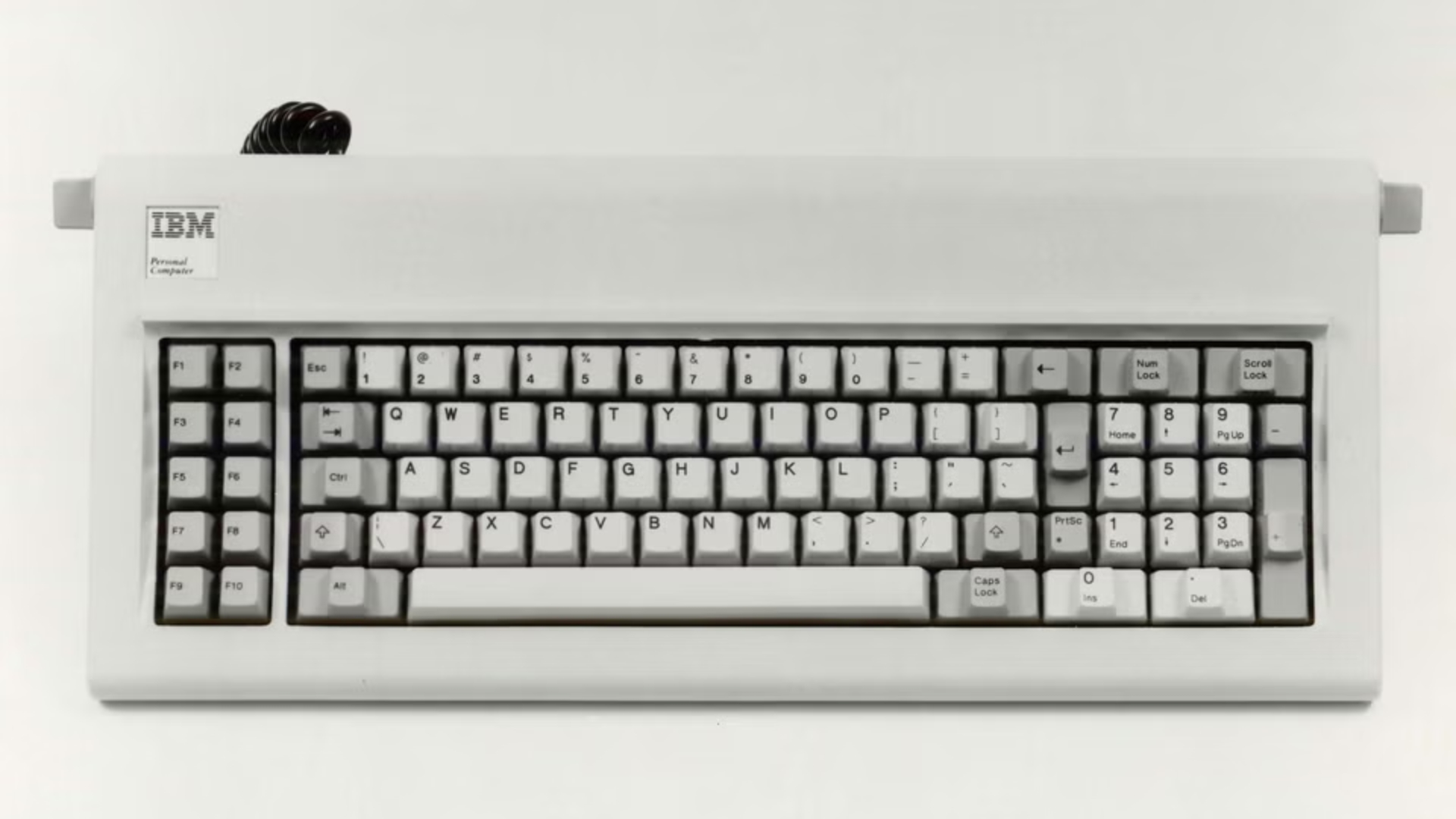
“I may have invented it, but I think Bill made it famous,” Bradley joked at the IBM PC’s 20th anniversary in 2001, while sharing a panel with Gates.
Microsoft turned Ctrl+Alt+Del into a security feature
Microsoft’s side of the story starts with Windows NT 3.1, which came in 1993. The NT team needed a secure attention sequence (SAS), a key combination no application could intercept.
According to Microsoft’s Larry Osterman, NT security architect Jim Kelly went looking for one, and “the only keystroke combination that wasn’t already being used by a shipping application was control-alt-del, because that was used to reboot the computer.”
Twenty years later, at the Harvard Campaign launch on September 21, 2013, Carlyle co-founder David Rubenstein asked Gates, “Why, when I want to turn on my software and computer, do I need to have three fingers on Control, Alt, Delete?”

“You want to have something you do with the keyboard that is signaling to a very low level of the software… that it really is bringing in the operating system you expect, instead of just a funny piece of software that puts up a screen that looks like a log-in screen,” Gates explained. He then blamed IBM, saying, “So we could have had a single button, but the guy who did the IBM keyboard design didn’t want to give us our single button,” before calling the result “a mistake.”
When Rubenstein brought it up again at the Bloomberg Global Business Forum in 2017, Gates said he would make it a single-key operation if he could make one small edit.
Gates’ memory may not have been in the right frequency. NT 3.1 came out 12 years after the IBM PC, and Microsoft put the Windows key on keyboards in 1994 with the Natural Keyboard. Ars Technica’s response at the time was “If Bill Gates really thinks ctrl-alt-del was a mistake, he should have fixed it himself.”
So, what happens is, Winlogon registers Ctrl+Alt+Del during boot “to keep other programs and processes from using it,” according to Microsoft’s documentation. Once you press it, Winlogon starts Logon UI on the secure desktop, which shows tiles from credential providers for your password, PIN or smart card.
Credential providers replaced the older GINA model starting with Windows Vista, and Microsoft isn’t clear about their role. “Credential providers aren’t enforcement mechanisms; they’re used to gather and serialize credentials,” the documentation says. The Local Security Authority (LSA) and authentication packages like Kerberos and NTLM do the checking.
Of course, the trusted path is only as safe as Windows could be. If malware already has kernel-level control of the PC, pressing three keys won’t save your password!
Windows 11 still uses it, but you can skip the three-key ritual
On Windows 11, Ctrl+Alt+Del takes over the display with a security screen where you can lock the PC, switch user, sign out, change a password, or open Task Manager, as Microsoft’s keyboard shortcuts page lists. If you only want Task Manager, you just need Ctrl+Shift+Esc. Saying this only because I know a lot of folks who prefer the detour.
Whether you need the shortcut to sign in depends on a policy called “Interactive logon: Do not require CTRL+ALT+DEL”, found in secpol.msc under Computer Configuration > Windows Settings > Security Settings > Local Policies > Security Options. When the policy is disabled, “any user is required to press CTRL+ALT+DEL before logging on,” unless they use a smart card.
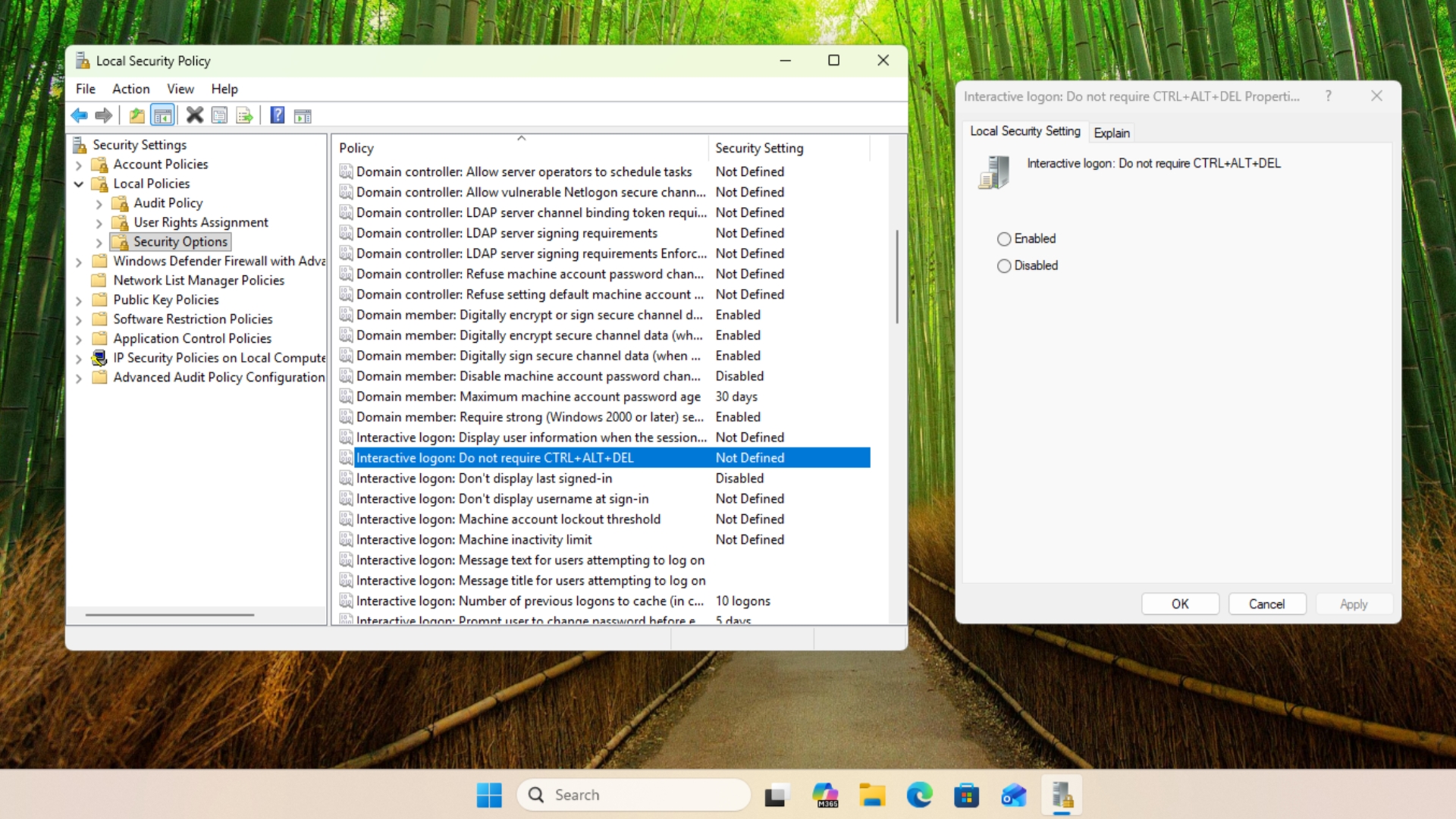
On a home PC that isn’t chained to a work domain, Windows doesn’t ask for it by default, which is why most people only see the lock screen. Windows 11 Home doesn’t include the Local Security Policy editor, but running netplwiz and opening the Advanced tab gives you a “Require users to press Ctrl+Alt+Delete” checkbox under Secure sign-in.
Microsoft says the option to skip the sequence exists for “users with certain types of physical impairments,” but warns that without it, malware could show a fake sign-in box and capture the password. On tablets without a keyboard, Windows tells you to instead press a hardware combination like Power and Volume Down, as Microsoft’s Raymond Chen explained in 2022.
| Condition | Instructions |
|---|---|
| Has power button and volume-down button | Power + Volume down. If a keyboard is attached, then also Ctrl + Alt + Del. |
| Has Windows key on bezel | Windows + Power. If a keyboard is attached, then also Ctrl + Alt + Del. |
| Is a Tablet PC | Ctrl + Alt + Del or Windows Security button. |
| Otherwise | Ctrl + Alt + Del. |
If you ask me, Gates is right that three keys are clumsy, but Ctrl+Alt+Del has aged better than MS-DOS file names or the rule that won’t let you name a file CON, as it still protects passwords on work PCs.
Ironically, Microsoft added a dedicated Copilot key to Windows keyboards in 2024, but there is no sign of the single security key Gates wanted, and maybe for the better. Do you press Ctrl+Alt+Del every day, or has Ctrl+Shift+Esc replaced it for you?