



When my PC is running slower than usual, and I open Task Manager, it’s either a Chromium instance using all my resources or Microsoft’s own services, such as Defender, with processes like Antimalware Service Executable using multiple gigabytes of memory, and even products like OneDrive. For the first, Microsoft quietly admitted you’re not alone, and many of its first-party apps and background services were using significantly more RAM than they do now.
Microsoft specifically mentions three background services, Defender, OneDrive, and Purview, where it has saved over half a gigabyte of RAM combined. Microsoft 365 is a separate improvement, and the Office suite now uses 360MB less memory. Together, these savings amount to over 860MB, which could make a difference on PCs with just 8GB of RAM versus 32GB of RAM, and nobody would disagree.
As first spotted by Windows Latest, Microsoft shared this information at one of the sessions at Ignite 2026, which I watched when it streamed live. According to the company, it has been working on Windows itself, as well as Microsoft 365 and other background services, to optimize memory usage.
“We want to make your experience get better on your existing devices as we improve Windows,” Ian LeGrow, who leads an engineering team responsible for the Windows core OS, explained during the Ignite 2026 presentation seen by Windows Latest.
LeGrow also explained why Microsoft has been taking memory optimization seriously, particularly on PCs with limited RAM.
“We all know this. Memory prices have gone up through the roof. And so having more memory in devices materially impacts the cost of those devices.
“And so we’ve spent a lot of work over the last several months since last January improving memory across a spectrum of devices with a special focus on 16 gig and 8 gig devices.”
Microsoft 365 now uses 360MB less RAM, and Defender, Purview and OneDrive save over half a gigabyte
Microsoft has declared that it’ll make Windows on 8GB RAM PCs feel faster, and we’ve heard that from the company multiple times. This year’s October 2026 update actually rolled out some of those improvements, and Microsoft reports up to 20% better responsiveness after the update.
At Ignite 2026, Microsoft reminded us of those numbers again.
“More memory for your apps by using less memory in Windows itself. So we’ve made Windows more efficient,” LeGrow explained.
Microsoft looked at different ways to reduce RAM without sacrificing features, including avoiding loading unnecessary components and sharing memory between components that use similar frameworks.
LeGrow explained how Microsoft has been doing that:
“We’ve been really thoughtful about how Windows can either not load all the components that it might have in the past or sharing memory between components, leveraging similar frameworks or the same framework across components to share memory.”
“These things have all reduced the consumption of memory that Windows is using in order to leave more memory for your apps and experiences.”
Microsoft has also been working on its own apps and background services, including Microsoft 365, Defender, Purview and OneDrive.
“So the Office Suite, Microsoft 365 uses 360 megabytes of memory, less memory than it did before, freeing up more memory,” LeGrow explained.
“A lot of those background services you don’t pay as much attention to, but are there, such as Defender, Purview, and OneDrive. Over half a gigabyte of memory saved on those, which is a big, big deal if you’re dealing with an 8 or 16 gigabyte device.”
I don’t know the individual memory savings for Defender, Purview and OneDrive, but I can confirm that the combined reduction is significant, particularly on lower-spec PCs.
Microsoft’s Office benchmark is also 10% faster on 8GB devices
Microsoft argues that Office apps are also 10% faster on 8GB RAM PCs, and shared that they tested a device with the January 2026 update, and a simulated Teams call, a 4K background video, 20 Edge tabs with apps, Outlook and several interactions with Microsoft 365 apps using large files.
LeGrow explained that the October build completed the workload about 21% faster than the January build!
“And so in the end, with the October build, we’re about 21% faster than the January build, which is really substantial.”
“Now, this is just a sampling. This is a 30-second clip. We’d run this over much longer periods of time, so we get a real feel for real world benefits from these improvements.”
Microsoft also says that its improvements aren’t limited to 8GB PCs, and the work done for lower-memory devices benefits PCs with more RAM too.
Robin Seiler, who leads Microsoft’s Windows commercial engagement team, explained that these optimizations translate to higher-memory devices as well.
“All of the work that we do for 8 gig translates for higher RAM devices.”
What we saw when we tested Windows 11 on 8GB and 16GB PCs
Back in October 2026, we tested Windows 11 26H2 on an old 8GB laptop, which already had AutoCAD and VS Code installed. Before installing the update, we restarted it on Windows 11 25H2 and opened Task Manager. As you can see in the screenshot below comparing the two versions, Windows was using 5GB. After we updated the same machine to 26H2 and restarted it again, that dropped to 3.3GB.
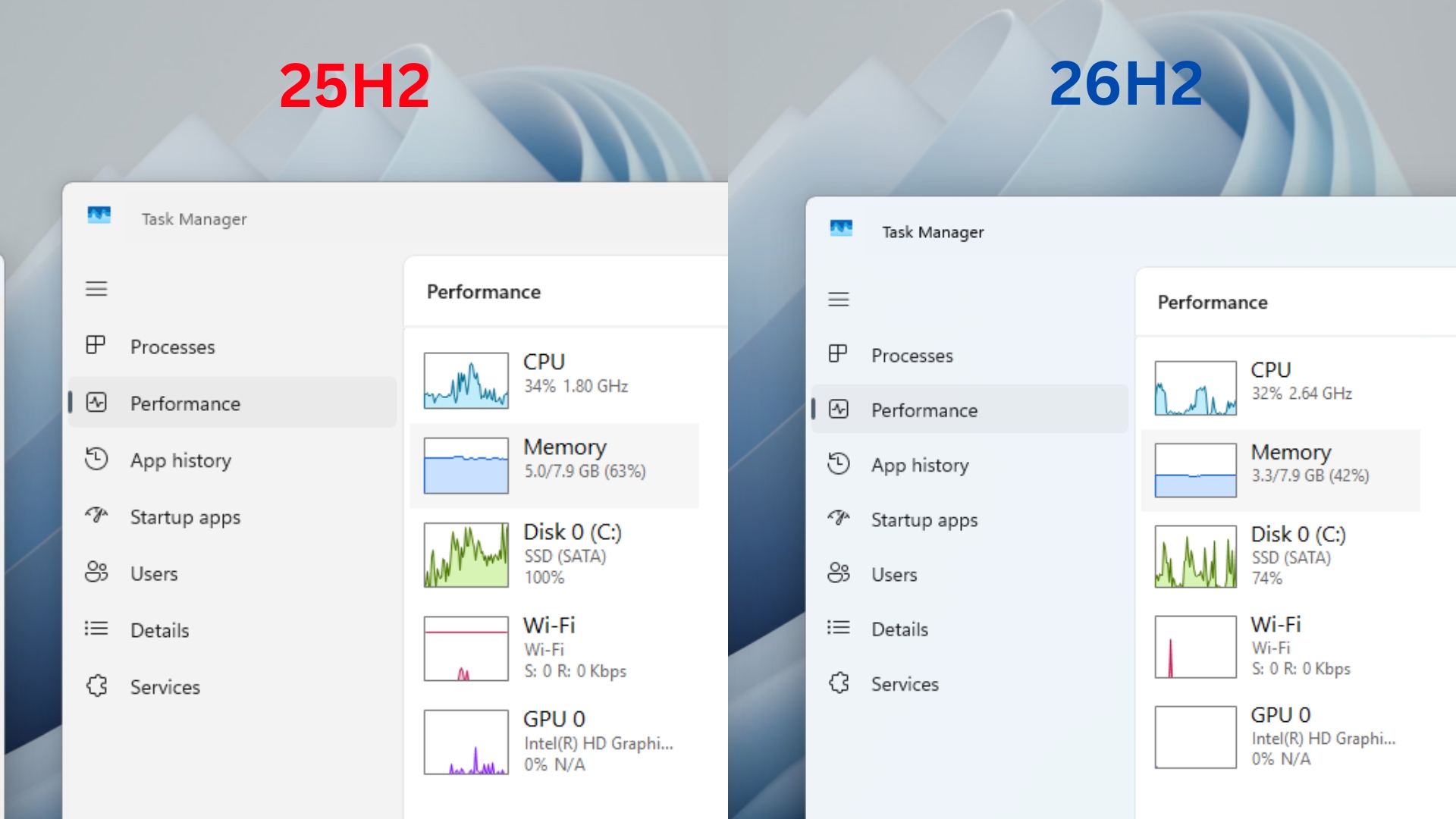
If you don’t understand what changed, look closely at the “Available” line, it went from 2.9GB to 4.6GB before we even opened Chrome.
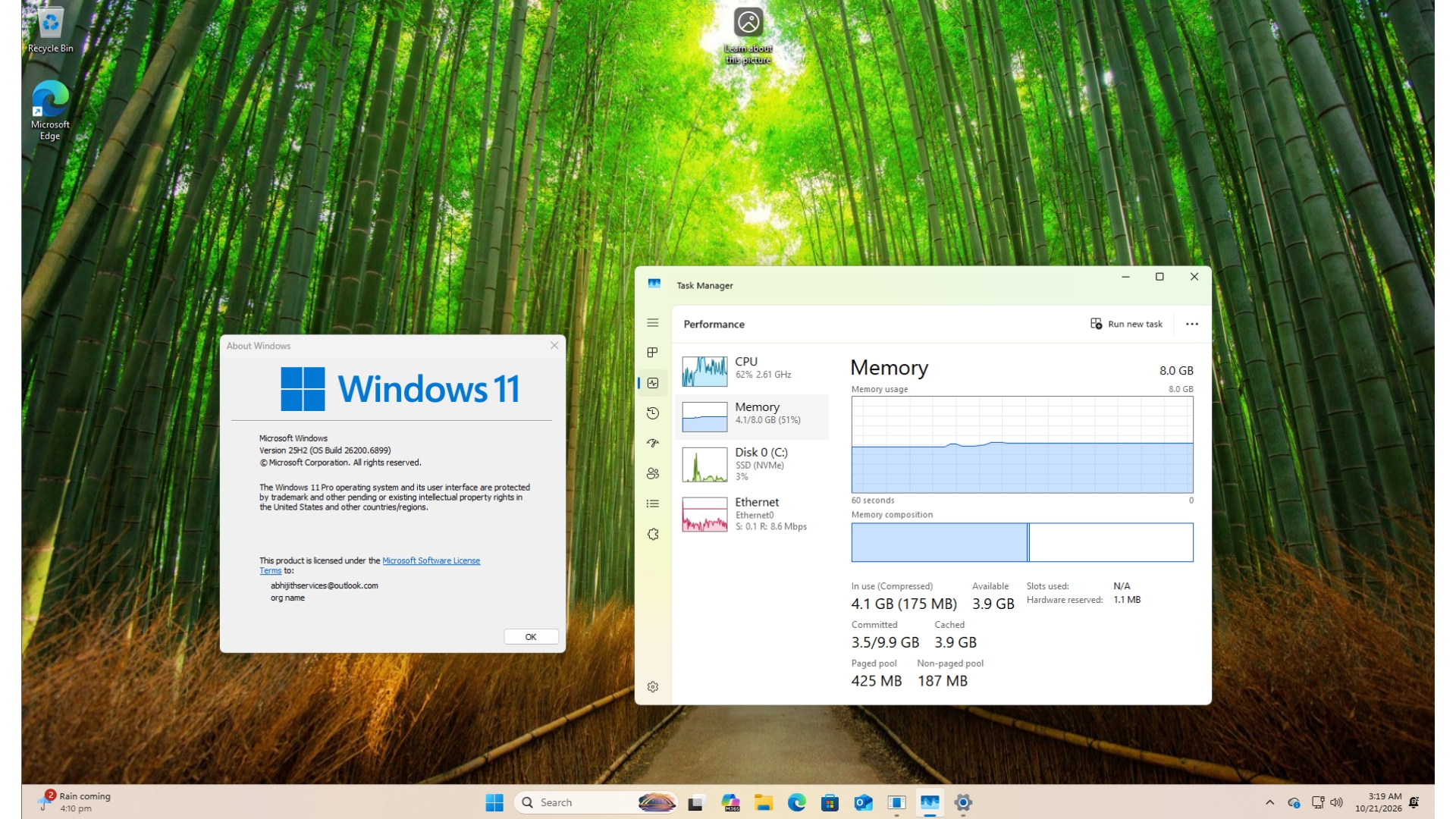
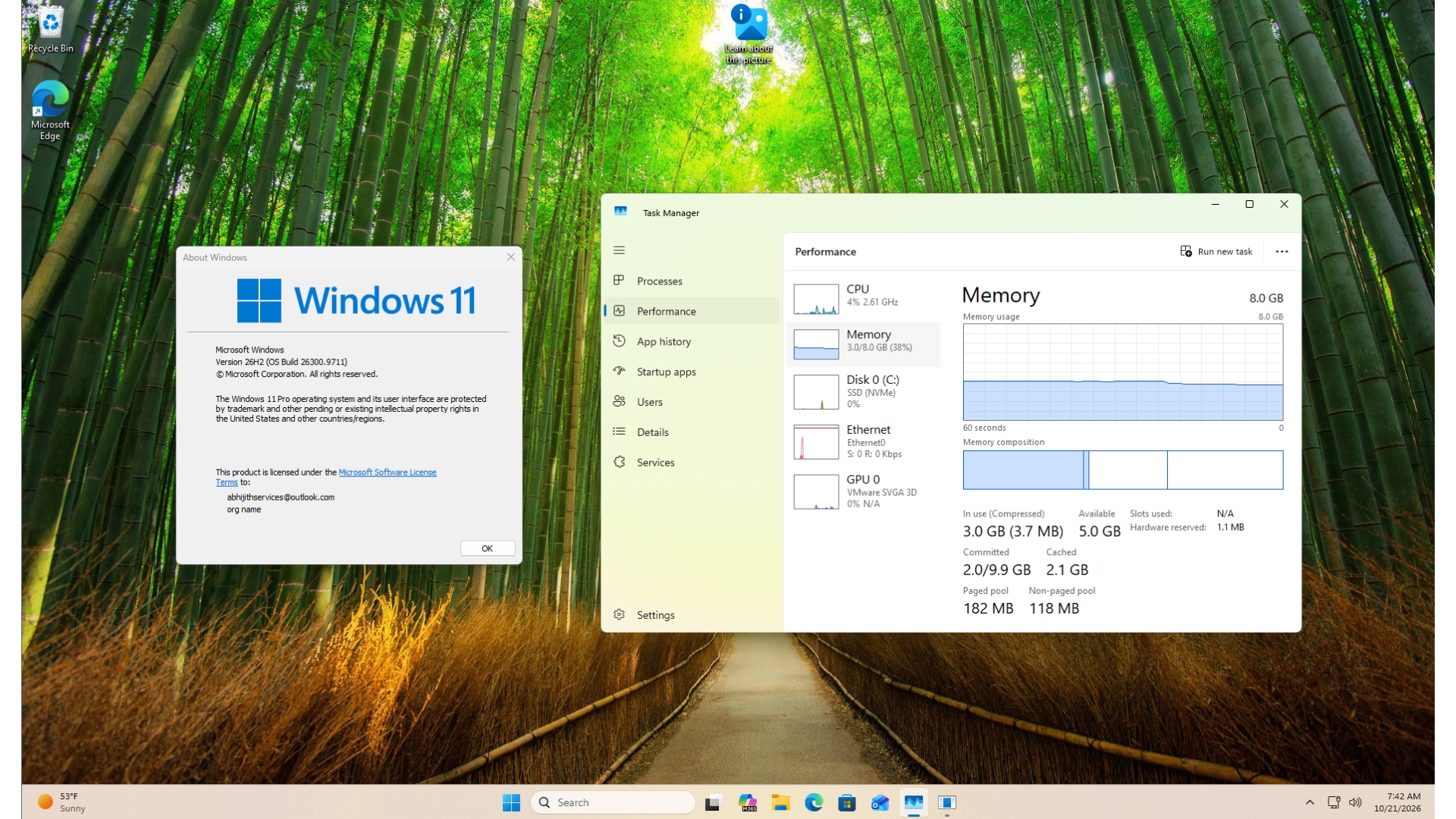
Likewise, we also tried a clean 8GB virtual machine, and memory use after a restart went from 4.1GB on 25H2 to between 2.8GB and 3.2GB on 26H2. With Widgets, we could see memory usage creep back up when we opened the Discover feed.
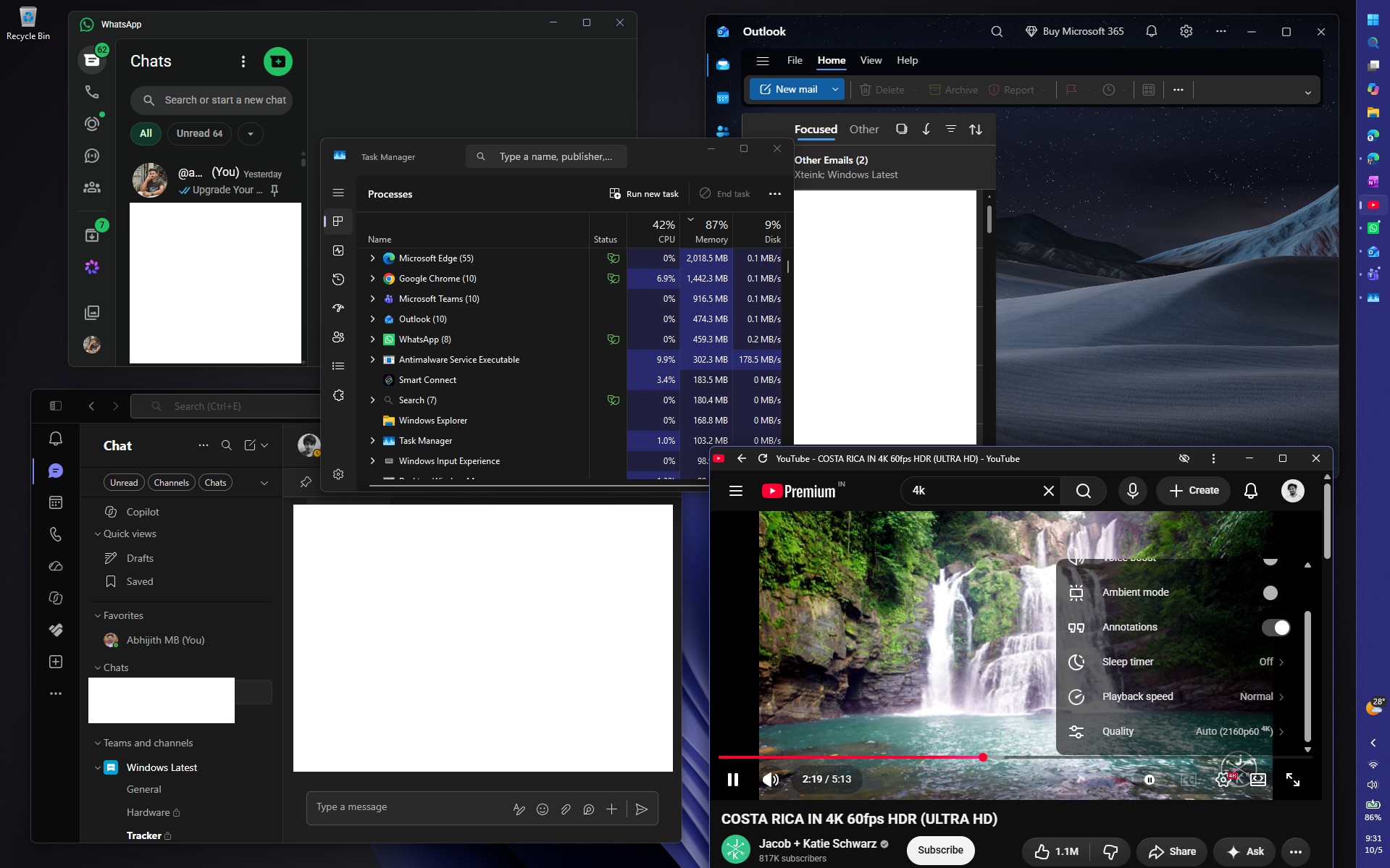
Our three-year-old 16GB laptop also used up to 2GB less RAM after a restart. With Edge, WhatsApp, Teams and Outlook open and a 4K 60fps YouTube video playing, memory usage hovered around 87%. We added Spotify, Paint and several more apps, and it still topped out at 89%.
What about you? Have you observed noticeably faster performance on Windows 11 after recent updates? Let me know in the comments below.