






For years, using your mic on Windows 11 made your headphones sound like a phone call over Bluetooth, and Microsoft is finally fixing it, but not everybody will get it initially.
For example, if you’re in a game or Discord call and you’re also listening to music on your Bluetooth headphones, you might have noticed the sound suddenly becoming muffled as soon as another app starts using your micrphone.
If you’ve ever experienced something similar, your expensive pair of headphones isn’t necessarily the problem. I’ve had this “issue” in some of my other use cases as well, and no, we’re not talking about the “reduce the volume of other sounds” feature.
Until now, Windows PCs, including Windows 10 and even Windows 7, have switched headphones to a lower-quality mode when an app starts using the microphone. This typically happens when you use the same headphones or headset for audio and the mic. When you’re affected, everything sounds noticeably worse for as long as the microphone is active.
Windows 11 can now keep better audio quality while you use the mic
In our tests, Windows Latest found that a recent Windows 11 preview build allows compatible Bluetooth headsets to play full-range stereo audio at 48kHz while their microphone is in use. This means your stereo audio won’t drop to the lower-quality mode when you’re speaking while listening to another app.
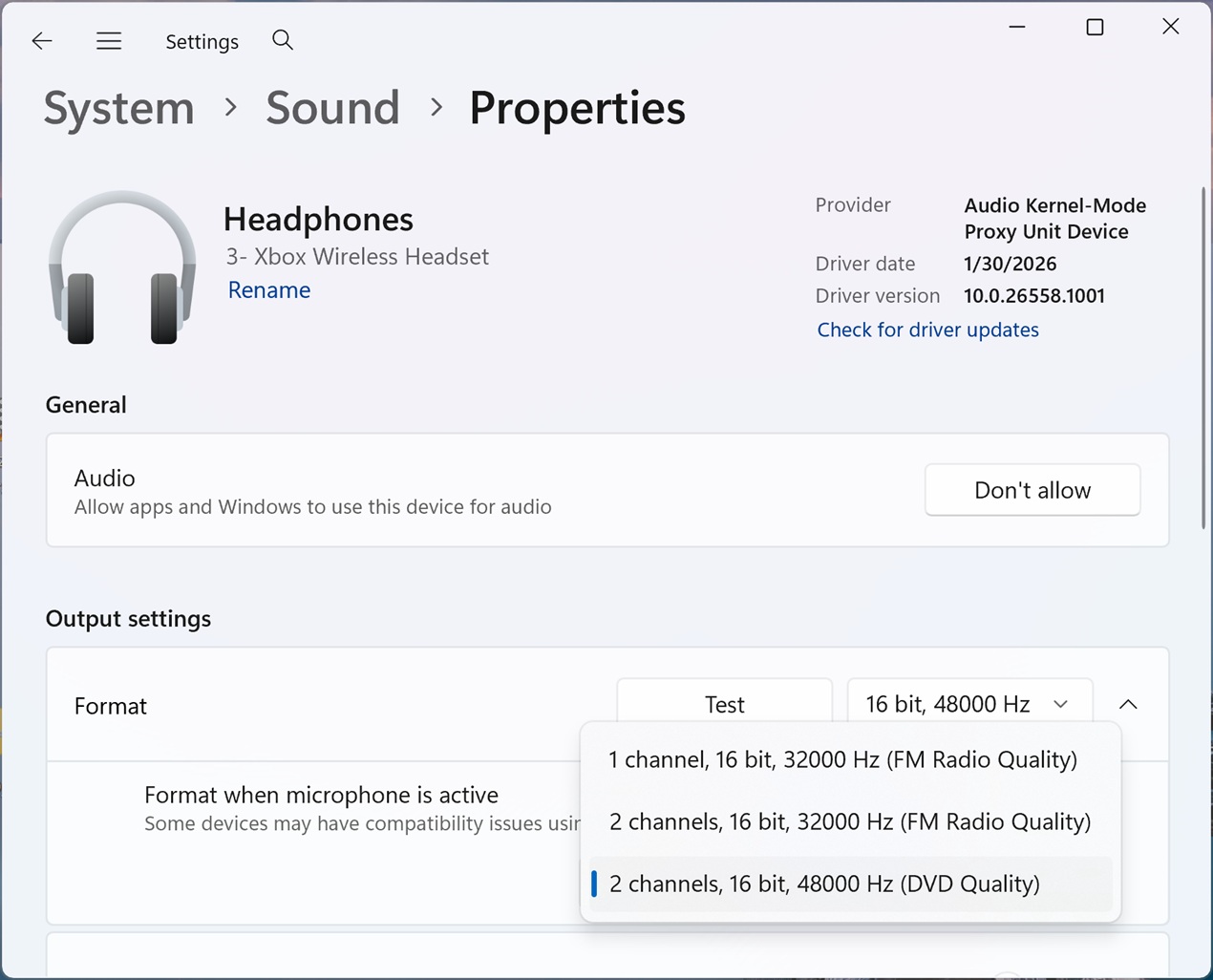
As you can see in the screenshot above, Windows has added a new “2 channels, 16 bit, 48000Hz” option. If you switch to it, audio can play at “full-range stereo fidelity” even when you’re using your microphone, including during game chats, calls, voice typing and voice chat.
You’ll find the option in Settings > System > Sound > Output > choose your Bluetooth device > Output settings > Format when microphone is active. But remember, it’s rolling out to testers first, so it won’t show up on production builds. I expect it to ship to all supported PCs outside the Insider program by March 2027.
Why do Bluetooth headphones sound worse when you use the mic?
Windows uses a Bluetooth profile called “A2DP” when you’re listening to Spotify, watching a movie in Edge or playing a game, as long as the microphone is not in use. This setup works well, but the moment an app starts using the microphone, Windows switches from A2DP to the Hands-Free Profile, or HFP.
By default, A2DP doesn’t support using the microphone and listening to audio at the same time, which is why Windows switches to HFP.
In 2025, Microsoft made some improvements to Bluetooth audio, including super wideband stereo on compatible devices, so you could get better audio while using the microphone.
But that didn’t really make a difference for everyone, and even Discord’s support document acknowledges the lower audio quality as a known limitation of Bluetooth:
“Listening to something on your Bluetooth headset and noticing a drop in quality when joining a Discord call? The headphones are probably switching to the Bluetooth ‘headset’ profile. This is required for low latency and microphone functionality on most Bluetooth headphones, but it provides a lower-quality audio experience,” Discord’s support staff explained in a document from 2022.
Your Bluetooth headphones no longer have to sound like a phone call when you unmute on Windows 11, but only if they’re new enough
You need a headset that supports Bluetooth LE Audio and 48kHz playback, and a PC that supports Super Wideband Stereo. If you’ve got both, you’re mostly sorted.
For context, headsets like Samsung’s Galaxy Buds2 Pro, which launched in 2022, were among the early models to support Bluetooth LE Audio, so you may already have a compatible pair. But buying a recent pair doesn’t guarantee that the new 48kHz option will work with your PC.
You can check whether your PC supports LE Audio from Settings > Bluetooth & devices > Devices. As you can see in the screenshot from my PC, I’ve got a toggle that says “Use LE Audio when available.”
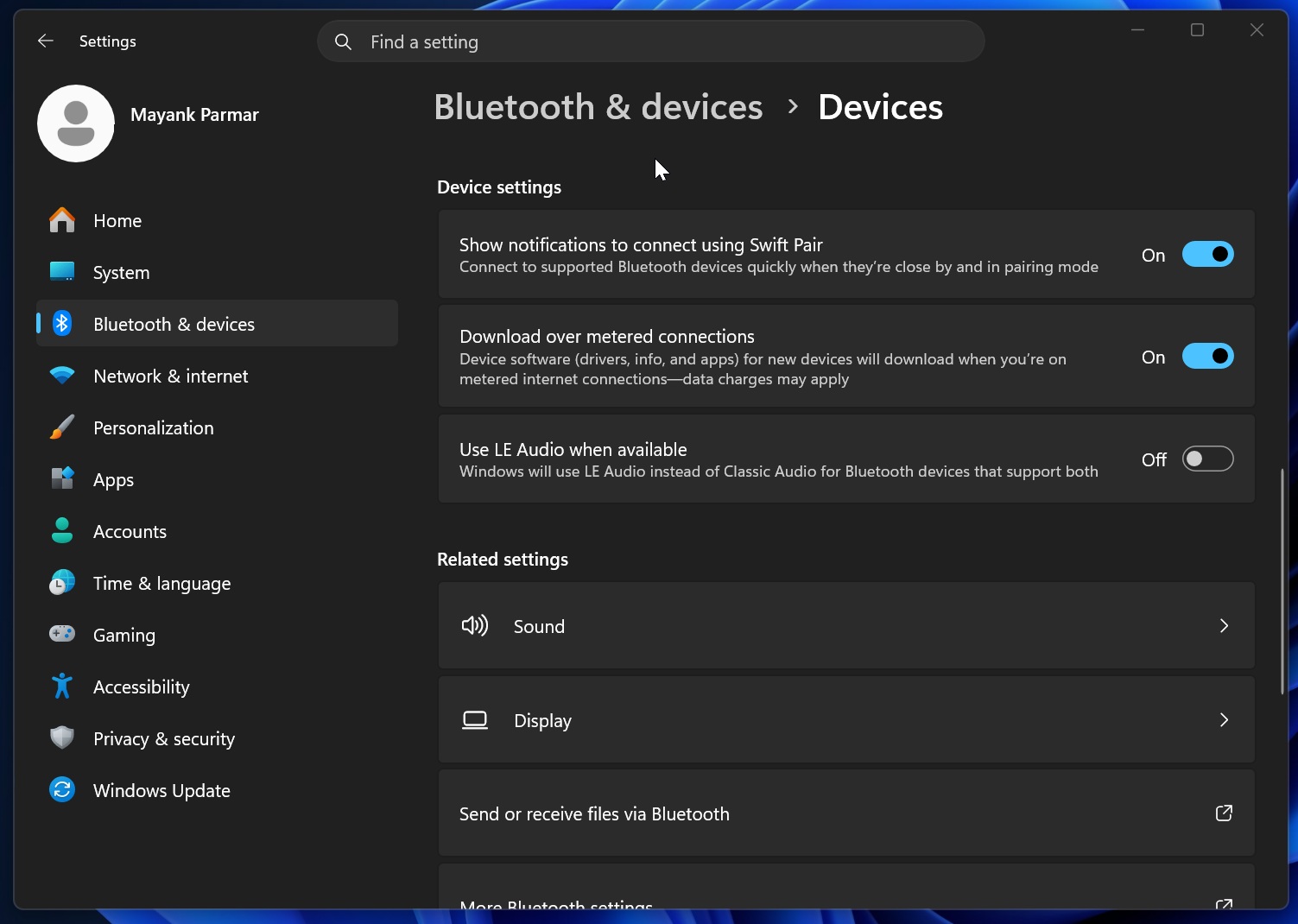
If it isn’t there, your PC doesn’t currently support LE Audio. The toggle alone doesn’t confirm support for the new 48kHz option.
Right now, it’s unclear if Microsoft will ever bring these improvements to all audio devices, as this problem hasn’t been limited to recent models.