







You don’t have to pay Adobe if you just want to edit, extract, merge, or organize PDFs on Windows 11, as Microsoft Edge is about to get one of its biggest updates.
Microsoft Edge is getting a built-in PDF merger alongside other new capabilities in January 2027, so you may no longer need to browse random websites to merge PDFs or buy Adobe Acrobat. Windows Latest understands it’s one of the biggest updates to Edge’s built-in PDF reader since Microsoft replaced its own solution with Adobe’s.
For those unaware, Microsoft maintained its own PDF engine for Edge, but in early 2023, it decided to ditch it in favour of the Adobe Acrobat PDF engine. It’s been more than three years since Edge started using Adobe’s engine, and Microsoft has mostly focused on migrating all of its legacy features to Adobe’s solution.
In fact, it still offered an “opt out” that allowed you to ditch Adobe and go back to Microsoft’s original PDF engine, but that toggle has now been removed with Edge 156.
That frees up Microsoft’s resources and will allow the company to once again focus on making Edge the preferred PDF reader on Windows 11, even if most people prefer Google Chrome for browsing the web. And if you’ve used Edge as a PDF reader, you’re not going to deny that it’s indeed far better than everything else available on Windows.
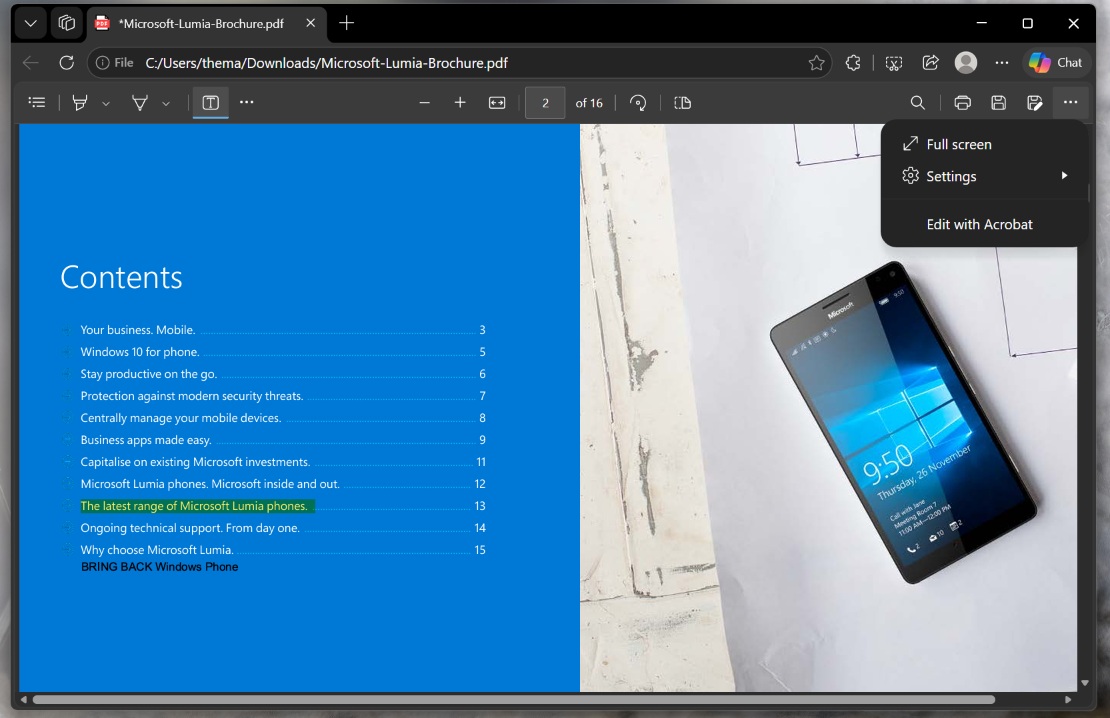
Right now, Edge’s PDF reader is mostly read-only, so you cannot reorganize pages or edit text, but you can highlight text, embed your own text, rotate the document, and do a few other things, like zoom in or out. I wouldn’t call it “editing,” but Edge still does a great job as a “viewer.” That could change soon.
Microsoft Edge will let you merge and organize PDFs
Microsoft quietly confirmed that it’ll let you organize and merge PDF files in Edge. You’ll be able to open a PDF in Edge, then open another PDF and merge both or select pages. You can also extract content from documents, even if they are scanned documents, and reorder pages as well.
“You can also merge the open PDF file with other PDF files that are open in Microsoft Edge tabs or stored on their device, to create a single PDF file,” Microsoft noted in a roadmap update spotted by Windows Latest.
The feature rolls out in January 2027, and Microsoft has told me that it’s not going to send your files or documents to Adobe’s cloud or any cloud for that matter.
“Files are processed on the device, and the original files aren’t modified,” the company noted, which means a fresh file would be created when you edit a PDF.
There’s also a new “notes” pane coming that will have all your ink notes, comments, highlights, and more in a single place. You can open a PDF, go to the pane, and revisit anything you’d like.
“Users can search and filter their annotations, jump to each one in the document, and edit, delete or add comments from the pane,” Microsoft noted in another roadmap update spotted by Windows Latest.
Edge for Windows and macOS will be getting all these new features.
Edge will also let you translate PDFs
Last but not least, you’ll also be able to translate all pages of PDF files in Microsoft Edge. Since it’s powered by Adobe’s solutions, I am expecting the browser to translate documents in up to 62 languages.
You might argue that Microsoft could have used Bing Translate, but I don’t think it would have been ideal for PDFs, particularly scanned PDFs, which is something Adobe can take better care of.
In any case, I am pumped that Edge’s built-in PDF reader, and soon editor, remains its best feature. But if you’re looking for something more powerful and free, I’d recommend using PDF Arranger, which is fully open source.
What do you use to open PDFs on Windows 11? Let me know in the comments below.