






It’s a popular myth that 32-bit Windows is limited to 4GB of RAM because a 32-bit address can only represent 2^32 combinations, which works out to 4GB. This is one of those things that sound true until you look at the history of Windows XP and Physical Address Extension (PAE).
Microsoft actually had a mechanism that let 32-bit x86 systems address physical memory above 4GB. Windows Server editions could use it to reach RAM above that line. Client editions deliberately did not. The limit was put in place to keep PCs from crashing because of insubordinate hardware drivers.
But why would more RAM crash PCs? And if 32-bit Windows could technically address more memory, why did Microsoft choose not to give ordinary users access to it?
Microsoft explains why 32-bit Windows could address more than 4GB with PAE
People assume 32-bit Windows is stuck at 4GB because a 32-bit number can’t count any higher, which is fair enough for virtual memory, but physical memory works differently.
Longtime Microsoft engineer Raymond Chen answered it years ago, and it’s because of a feature called Physical Address Extension. Also known as PAE, it’s something Intel built into the Pentium Pro that let 32-bit x86 chips work with 36-bit physical addresses instead of 32.
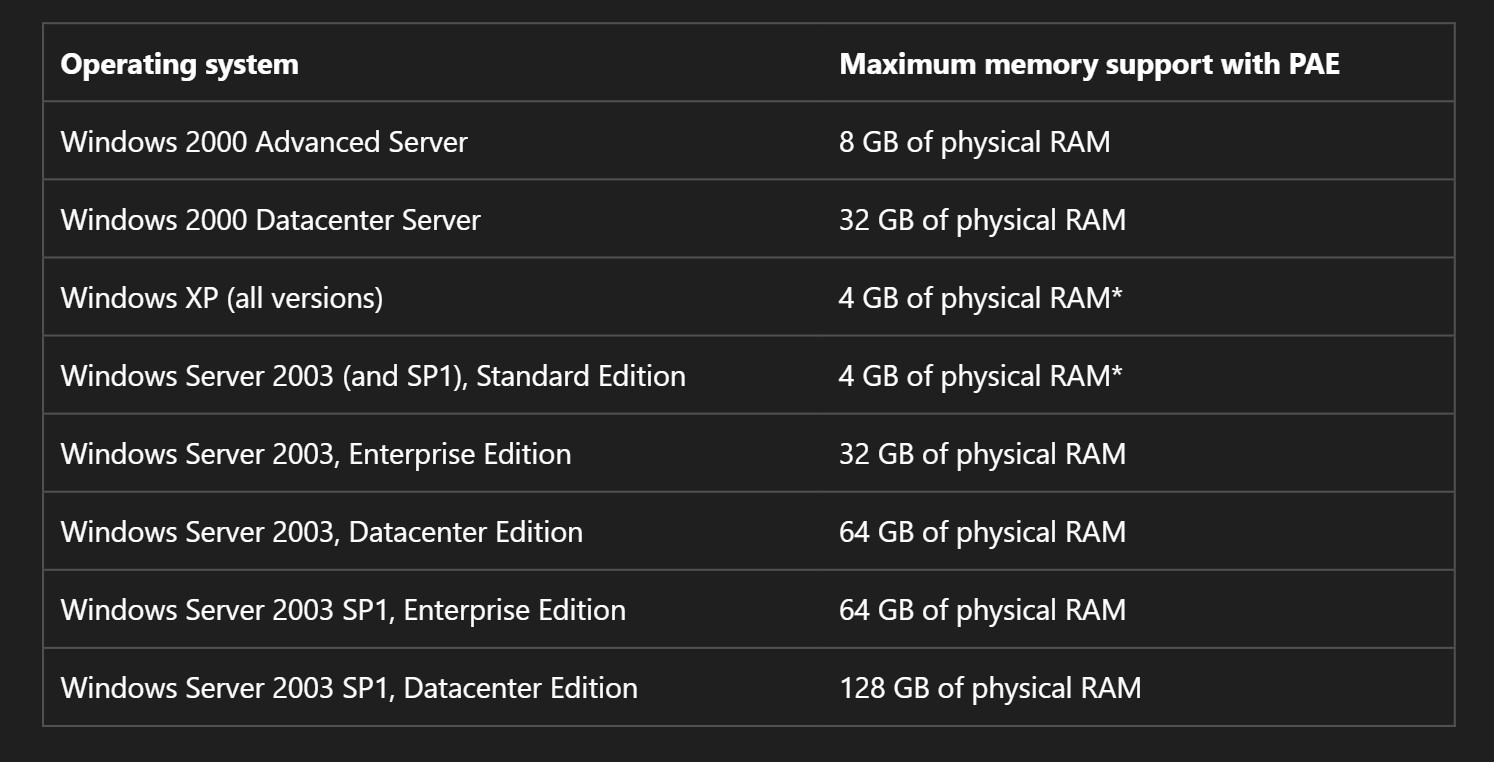
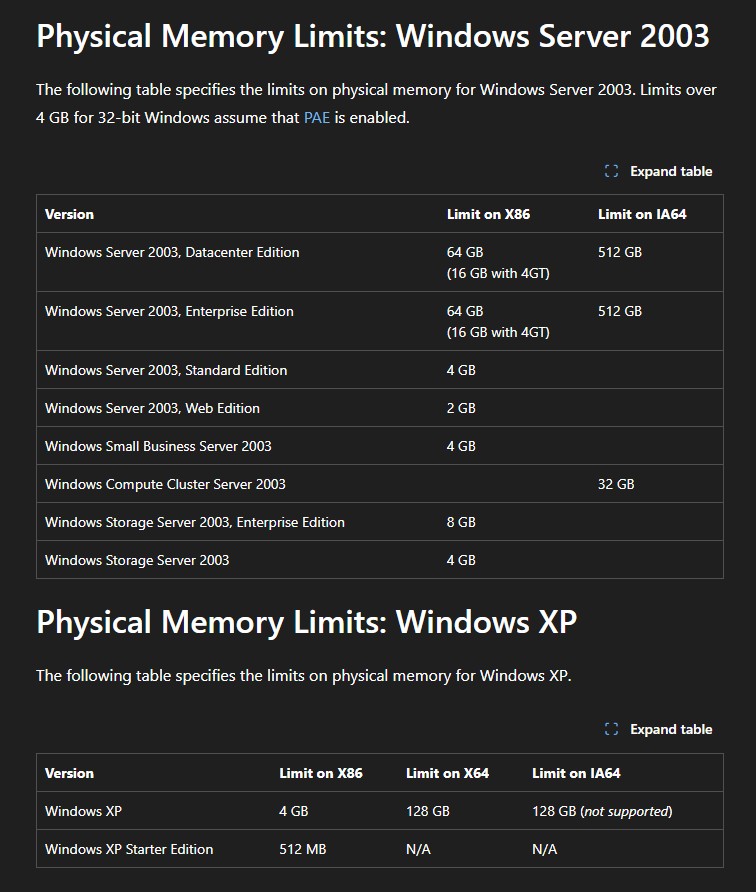
Windows still hands each 32-bit program a 4GB virtual address space, though a normal program only gets to use 2GB of that, with the rest reserved for the system. What changes is how much physical RAM the operating system can juggle behind the scenes. Microsoft’s PAE documentation shows just how far those extra bits stretched. Windows Server 2003 SP1 Enterprise went up to 64GB, and Datacenter topped out at 128GB on chips that could address that far.
So, it became a question of what the CPU could technically do and what Windows client editions let you use.
The real problem was the thousands of hardware drivers Windows had to support
So, if the hardware could go further, why didn’t Microsoft just let everyone use it? Chen’s answer is about drivers!
Once PAE is used to hand out RAM above 4GB, a driver can no longer assume a physical address fits comfortably inside 32 bits. Windows documentation on PAE shows what can break in driver code:
- Drivers that ask Windows for a physical address and then discard the upper bits point the hardware at the wrong place.
- Any code that quietly truncates addresses starts throwing away data.
- Drivers doing DMA transfers need to keep virtual and physical addresses strictly separate, which is something a lot of older code didn’t bother with.
Microsoft’s support document says: “Typically, device drivers must be modified in a number of small ways. Although the actual code changes may be small, they can be difficult. This is because when not using PAE memory addressing, it is possible for a device driver to assume that physical addresses and 32-bit virtual address limits are identical. PAE memory makes this assumption untrue.”
Imagine what happens when a driver gets a physical address that needs more than 32 bits and just chops it down anyway. Windows thinks it wrote data to one spot. The hardware puts it somewhere else. Depending on what gets overwritten, it can cause a memory corruption or a crash.
Consumer PCs were full of this kind of risk. Printers, scanners, webcams, sound cards, whatever random expansion card someone picked up, all needed drivers that most people at Microsoft didn’t test against PAE.
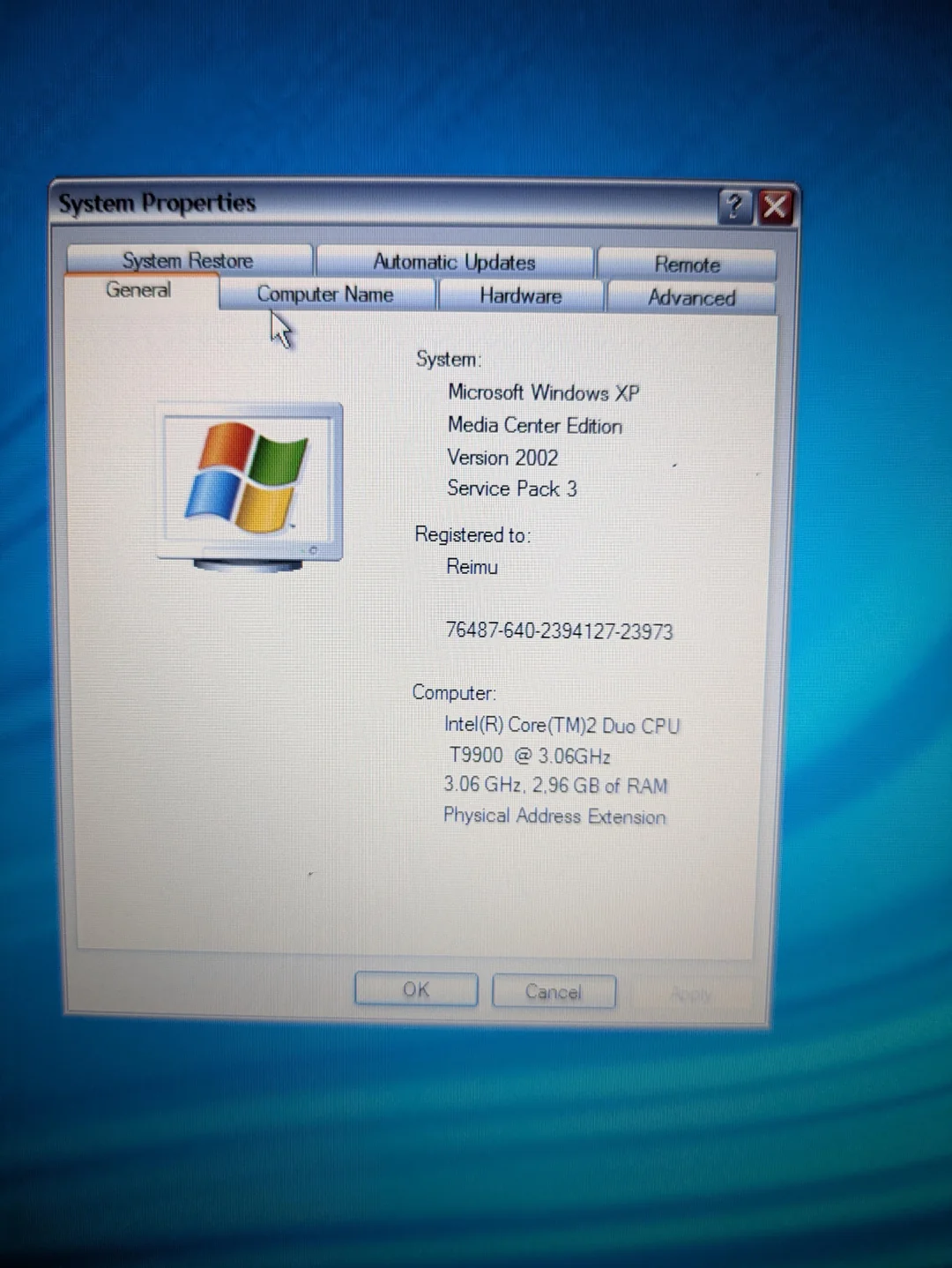
This specifically hit Windows XP SP2 and Windows Server 2003 SP1 Standard Edition. Microsoft changed the hardware abstraction layer in both to cap physical address space at 4GB, precisely to stop untested drivers from corrupting memory when PAE exposed more of it.
What happened to 32-bit Windows?
As we moved to 64-bit, PCs with only 4 GB of RAM became all the more rare and, as Chen said: “Windows began discouraging the production of systems using 32-bit processors in 2020, finally ending the production of 32-bit editions entirely with Windows 11”
So why did Windows Server get to use more than 4GB of RAM?
It becomes obvious when you realise that Windows Server and Windows for regular users are two completely different ecosystems. Server administrators run tightly controlled systems with carefully selected hardware.
“Memory above 4 GB is enabled on server because if you are a server administrator, you don’t install random drivers for that hand-held scanner you bought at Best Buy from the bargain bin for $10.”, says Chen.
Server admins stick with the plain vanilla drivers that come with Windows, and as Chen mentions, they won’t even bother installing manufacturer video drivers. The important part here is that every driver that came with Windows has been tested for addresses above 4GB. But a $10 scanner’s driver from 2001 wasn’t tested, and there’s a good chance it truncates those addresses and corrupts memory.
We consumers, install practically anything. Server administrators install as little as possible. Most consumers have no technical expertise, but Server administrators have skilled staff on hand to manage things.
Microsoft’s documentation confirms Windows XP SP2 and Windows Server 2003 SP1 Standard Edition changed the hardware abstraction layer to limit physical address space to 4GB, reducing driver-compatibility risk.
Chen also canned the cynical theory that Microsoft limited RAM to push people onto Windows Server. But the fact that the cheapest Windows Server 2003 edition that supported more than 4GB was Enterprise, which cost a whopping $3,999, is more than enough reason to dismiss it.
Imagine if Microsoft had made developers optimize for RAM instead
Microsoft is currently trying to make Windows 11 run well on 8GB PCs after years of Windows and third-party apps growing increasingly memory-hungry. Truth be told, the MacBook Neo also had a role in it, as we reported.
But what if the industry had spent another decade as if RAM were scarce? Thanks to AI, it became a reality, and developers now seem to care more about memory footprints.
Apps that casually eat hundreds of megabytes today might look very different. WhatsApp is an exception, though, as Meta shows no interest in optimizing their app. While the old 4GB limit didn’t cause today’s software bloat, this is a reminder that hardware limits tend to force efficiency, while abundance rarely does.