







Microsoft Teams is rolling out a new AI-powered feature called Facilitator, which can watch or listen to your meetings and proactively address knowledge gaps. This means that if a member in a meeting is unable to put their point forward because they do not understand the subject, Teams’ new AI can jump in and share relevant answers using web search in chat.
Teams Facilitator sounds like a neat idea, but it might come across as a privacy concern if you are not a fan of AI monitoring your meetings to detect knowledge gaps and identify when participants’ questions go unanswered. Fortunately, Teams AI will be disabled by default.
“We are introducing a new Microsoft Teams Facilitator capability that proactively detects and resolves knowledge gaps during meetings,” the company noted in an update on the admin portal spotted by Windows Latest. “Facilitator can identify when participants ask questions or express uncertainty and retrieve and share relevant answers using web search in the meeting chat.”
For example, if you are in a meeting with your employee and have a back-and-forth conversation with the rest of the participants, let’s say five, and one participant asks a question or appears uncertain, Teams’ AI-powered feature can detect that the topic was unanswered or there’s uncertainty around it.
In those cases, Teams AI can automatically send an answer in the meeting chat:
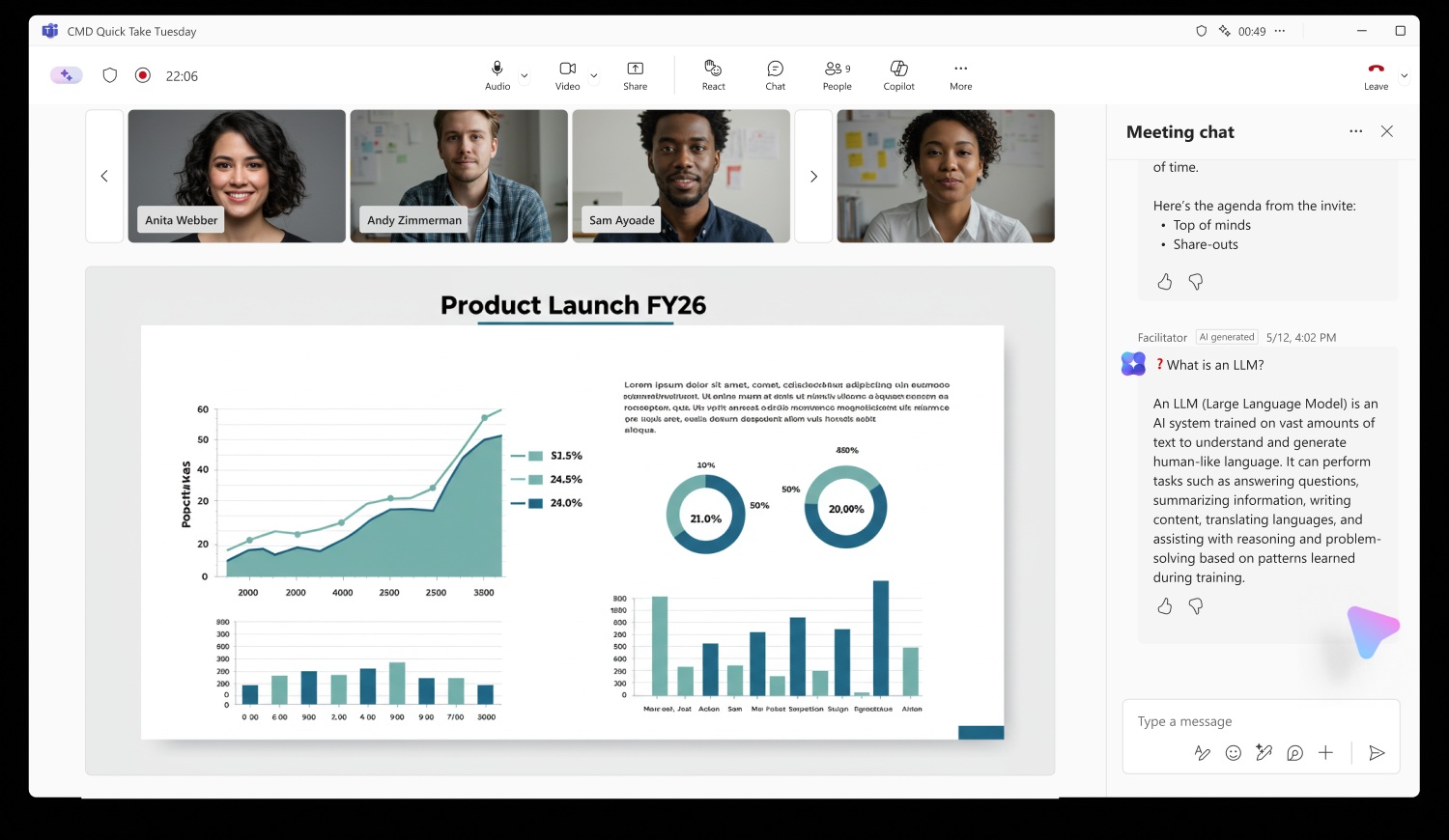
Teams’ AI would not start speaking in the middle of the meeting, at least not now. Windows Latest understands that Facilitator only works in the meeting chat, and it’s not turned on by default. Plus, it also comes with admin controls, so if an organization rolls out the feature, admins can choose where it shows up.
Microsoft argues that the feature can reduce interruptions because AI can search the web and answer the topic in the chat. It’s also confident that using AI to detect knowledge gaps or uncertainty and then address them with AI-powered web answers could make meetings more productive.
What triggers Microsoft Teams AI feature?
If you have unknowingly turned on Facilitator support in Microsoft Teams, you will notice that the feature is added to your meeting, but it’s triggered only depending on the context in real time. If Teams AI feels the meeting needs certain information and there’s a gap in the conversation, it’ll jump in through the meeting chat.
However, Teams AI responses are expected to be infrequent in practice, and Microsoft says they typically occur less than once per meeting. Responses are also limited to questions relevant to the meeting discussion based on agenda signals and conversational context.
Facilitator is supported only in standard Teams meetings. It does not work in calls, webinars, or town halls. Microsoft says it also works in meetings that include external or cross-tenant participants.
Microsoft Teams’ AI will process your meeting data
I found that Microsoft has an FAQ that answers some questions around the controversial AI Facilitator feature.
Microsoft says the Teams AI feature can process meeting conversations in real time to detect knowledge gaps and generate responses. In fact, responding to a question around AI’s data usage, Microsoft confirmed Facilitator uses AI to interpret meeting content and generate contextual responses during meetings. It stores everything.
That means Facilitator participates in the meeting, processes the conversation using AI, searches the web when needed, and responds in the meeting chat.
If you feel your privacy is being threatened, you can remove Facilitator from the meeting. Admins can also disable Facilitator at the tenant level, and the feature depends on the Copilot web search setting. If web search is disabled, Facilitator will not generate responses.
While Microsoft answered almost all questions, it did not explain if it will train AI models on your meeting data. It also did not warn about AI hallucinations.
Microsoft won’t turn on Facilitator in all Teams meetings
As I noted, Teams Facilitator must be manually added to the meeting, and a user with a Microsoft 365 Copilot Premium license must enable it. Other participants do not need a Copilot Premium license to see the AI-generated responses.
This feature will begin rolling out in early August 2026 for Targeted Release users and become generally available by late August 2026.
While Teams is rolling out these fancy AI features, its Windows 11 app is still a memory hog, and the company is doing little more than applying a Band-Aid.
Teams has major performance issues
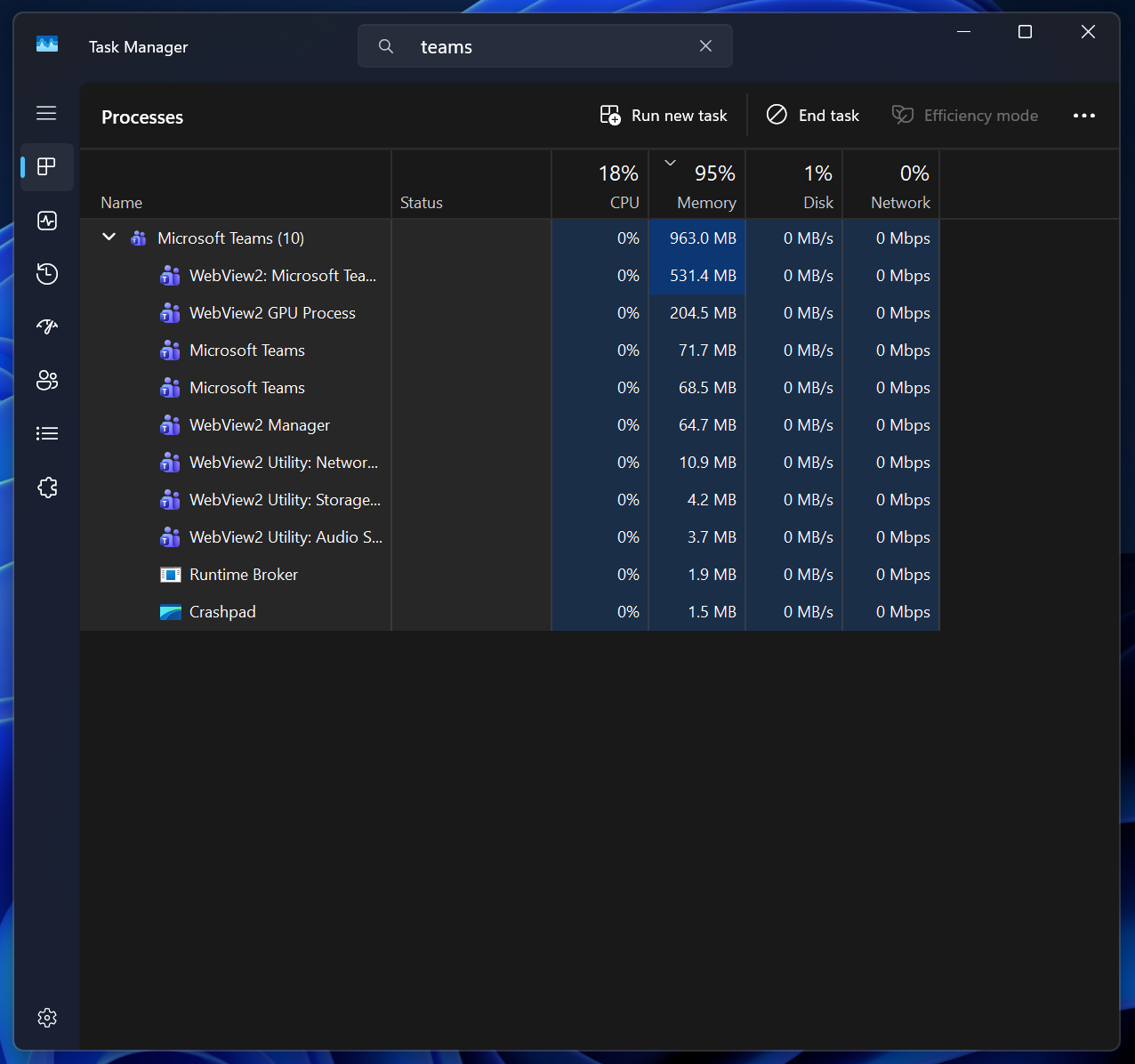
For example, Microsoft recently said it’ll move Teams calls to a separate process (.exe) to reduce the impact on the primary process. Teams will also roll out Efficiency mode to reduce RAM usage, and I do not expect Facilitator to be enabled on low-end PCs with this mode toggled on.
None of these changes address the underlying performance concerns, which are largely due to the WebView2 architecture of Microsoft Teams. But there are some good changes on the horizon, including simpler meeting controls and reduced accidental screen shares.