





Microsoft Teams is getting a new update on Windows 10 and macOS with the ability to open Teams apps like To Do in separate windows and more.
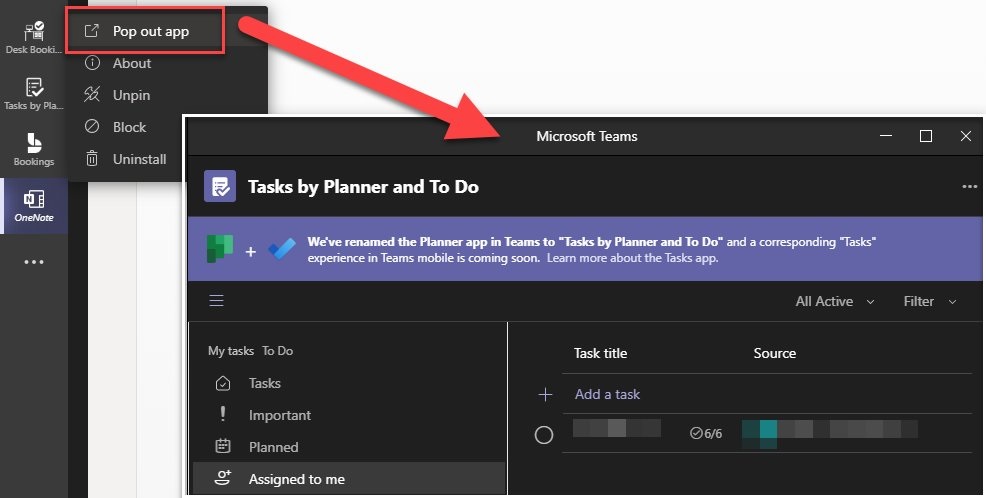
This feature is already available for your meetings, and Microsoft is now enabling support for separate windows for personal apps like Microsoft To Do. After the update, you’ll be able to pop out your apps or tools into a separate window and then resize, reposition, or close the window without accessing the primary window of Teams.
Separate windows support makes multi-tasking easier when you are in a meeting and you want to use more than one app.
To use this feature, simply open the left navigation pane and right-click on your app, like To-Do. When done properly, you’ll see a context menu with a new option called ‘pop up’. Click on the option, and Microsoft Teams will open the app in a separate window.
In addition, Microsoft is also rolling out support for customizable badges. This will allow users to create custom praise badges for users with a name, photo, language, etc.
Better attendance report
Microsoft currently allows teachers to instantly download the attendance report from the meeting tab. In early 2021, Microsoft Teams will get enhancements for the attendance report feature, which includes additional data to better manage attendance.
Emails integration
Microsoft has also updated its roadmap to confirm that it will add the ability to share your Outlook emails on Teams. This will let you share Outlook emails in chats and channels in Microsoft Teams. In addition to Outlook email integration, you can now create a specific calendar for participants and sync it to the calendar.
Along with Outlook integration, Microsoft has recently rolled out support for breakout rooms, native notification support, as well as support for LinkedIn-like reactions.
Breakout rooms and Windows 10 notifications
We also noticed that Teams is adding breakout rooms, one of the most requested features, and something that works with other similar meeting apps. With Breakout rooms, you can divide participants into smaller groups, and it works very well in different scenarios, such as brainstorming sessions, college assignments, or even mass recruitment.
You can create up to 50 breakout rooms,and automatically or manually assign participants. As an organizer, you’ll have the option to move between rooms, send announcements to everyone, and eventually close the rooms to bring participants back into the main meeting.
We found another notable feature, but it’s specifically limited to Windows 10.
On PCs with Windows 10, you can now enable native notifications for Teams. Right now, Teams uses its own notifications and does not call back to Windows 10’s notificiations/ pop-up. That means it doesn’t integrate well with the Do Not Disturb mode or show up in the Action Center if dismissed or missed.