


Starting November 18, Microsoft says Windows 11 26H2 downloads and installs itself on eligible PCs, even if you’ve never clicked “Check for updates.” Microsoft has begun automatic delivery earlier than many expected, and in our testing on an 8GB laptop, it’s one update you probably don’t need to dread.
Windows 11 26H2 originally shipped on September 29 and began showing up on more PCs in October 2026. Based on the past trend, you’d expect the update to begin installing itself at least 6 to 8 months after release, but Microsoft appears to be really confident that Windows 11 26H2 has no issues, which is why it has already begun force-installing the update.
Until now, you could get Windows 11 26H2 by manually checking for updates, but starting November 18, you don’t have to actively seek it. In a support document spotted by Windows Latest, Microsoft confirmed it’ll automatically install the update, and you can’t dodge it unless you’re willing to pause Windows updates for weeks or months. But trust me, you don’t have to.
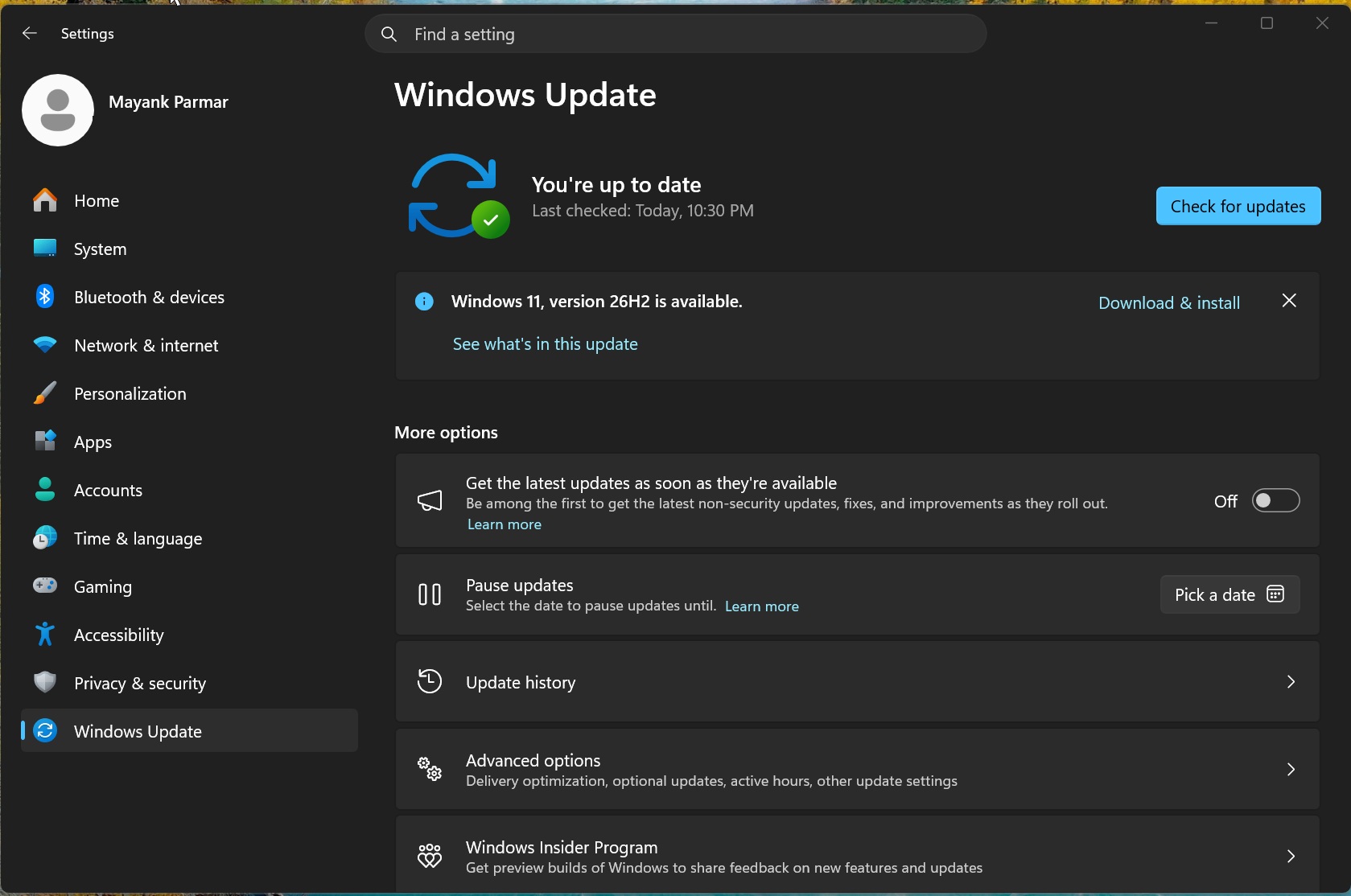
“We are gradually expanding automatic delivery, beginning with devices running Windows 11, versions 24H2 and 25H2, that are not managed by IT departments,” the company explained in an updated document first spotted by Windows Latest. This changes how most of you’ve been getting Windows 11 26H2, which is by clicking the Download & Install button, as shown in the below screenshot:
Microsoft says automatic installation is a gradual process, so you won’t necessarily be upgraded today. If you’ve got an eligible PC without a compatibility hold, you could be upgraded in the coming days or weeks, with any required restart generally scheduled outside active hours.
“As the rollout progresses, more devices receive the update automatically, without needing to manually check for updates or initiate the download. This process depends on Windows Update settings and is available for personal devices and non-managed business devices,” the company noted.
Microsoft is using AI to decide who gets Windows 11 26H2
Windows Latest understands that the automatic installation is powered by AI/ML, where Microsoft relies on data and telemetry to decide how far the update should reach.
Unlike previous years, Microsoft is being careful this year with how it chooses to brag about Windows 11 26H2’s successful rollout.
For Windows 11 25H2, 24H2, 23H2 and past versions of Windows, including Windows 10, Microsoft has never missed an opportunity to talk about its machine learning-driven approach to automatic installations of Windows updates.
But since Microsoft is criticized for AI all the time, and Windows’ reputation is at an all-time low, the company is carefully refusing to admit it’s using AI/ML to decide who gets Windows 11 26H2 automatically.
Windows 11 forced updates aren’t always bad, and 26H2 comes with speed improvements for 8GB PCs
I wouldn’t worry about Windows 11 26H2 or any recent updates, for that matter, as 26H2 is based on Windows 11 24H2, which also powers 25H2. It installs quickly on eligible PCs, too.
Plus, as I’ve been arguing for a long time, Windows 11 26H2 solely exists to extend the support life of your Windows installation, and it also includes recent performance improvements that previously rolled out via monthly cumulative updates.
Of course, installing Windows 11 26H2 wouldn’t magically make PCs faster. Microsoft noted that the October 2026 update or newer includes performance fixes for PCs with 8GB of RAM, so you’d notice that the overall performance is better if you’ve got one of these lower-end PCs. That doesn’t mean higher-end PCs aren’t getting the same changes, but they’re more noticeable on lower-power machines.
Microsoft confirmed that it has made opening Start, Search, Settings and File Explorer faster, and you’ll notice up to 20% improved responsiveness on 8GB PCs compared with the January 2026 update. Windows Latest also understands that a multitasking session finished up to 40% faster in one lab test on an 8GB Snapdragon PC.
In our own test of an 8GB laptop, Task Manager showed around 5GB of RAM in use after a restart on 25H2. After updating to Windows 11 26H2 and restarting, that dropped to around 3.3GB.
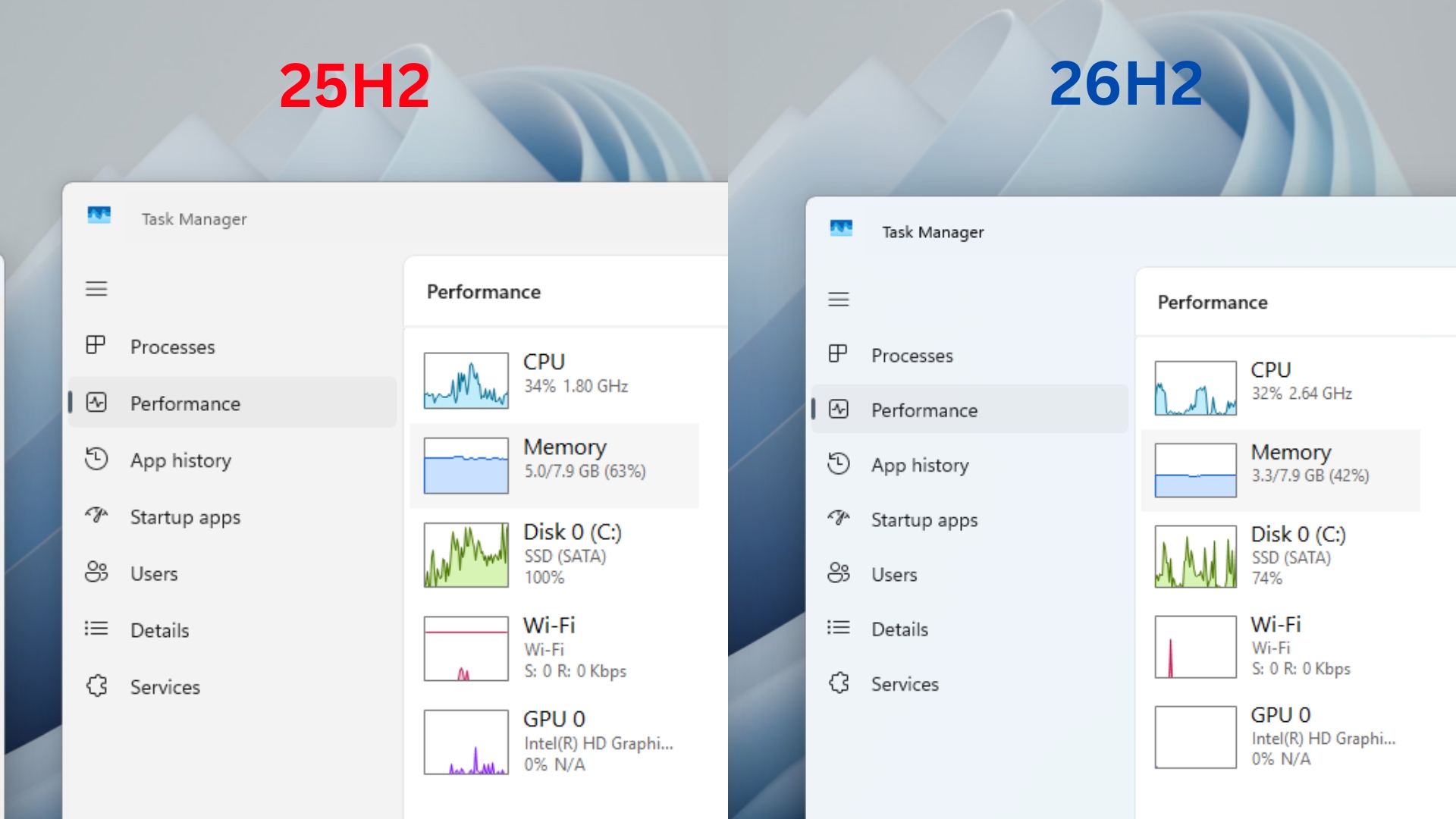
There are several under-the-hood changes. For example, Windows Latest found that Windows 11 26H2 can keep up to 2GB more active data in memory rather than moving it to slower storage.
In any case, Windows 11 26H2 is a great update because it doesn’t seem to break anything, and Microsoft has confirmed there are no new active known issues.