






Microsoft’s new Windows Recovery tool, Cloud Rebuild, just got access to two new features in the latest Windows 11’s preview builds: Drive Sanitization and Remote Deployment via Recovery CSP.
In the fun days of Windows recovery, we have played around with Reset this PC, recovery partitions, USB installers, OEM recovery tools, and, when none of this worked, we had to use another working computer to build an installer. Those days are essentially gone as Microsoft is now giving it to the cloud.
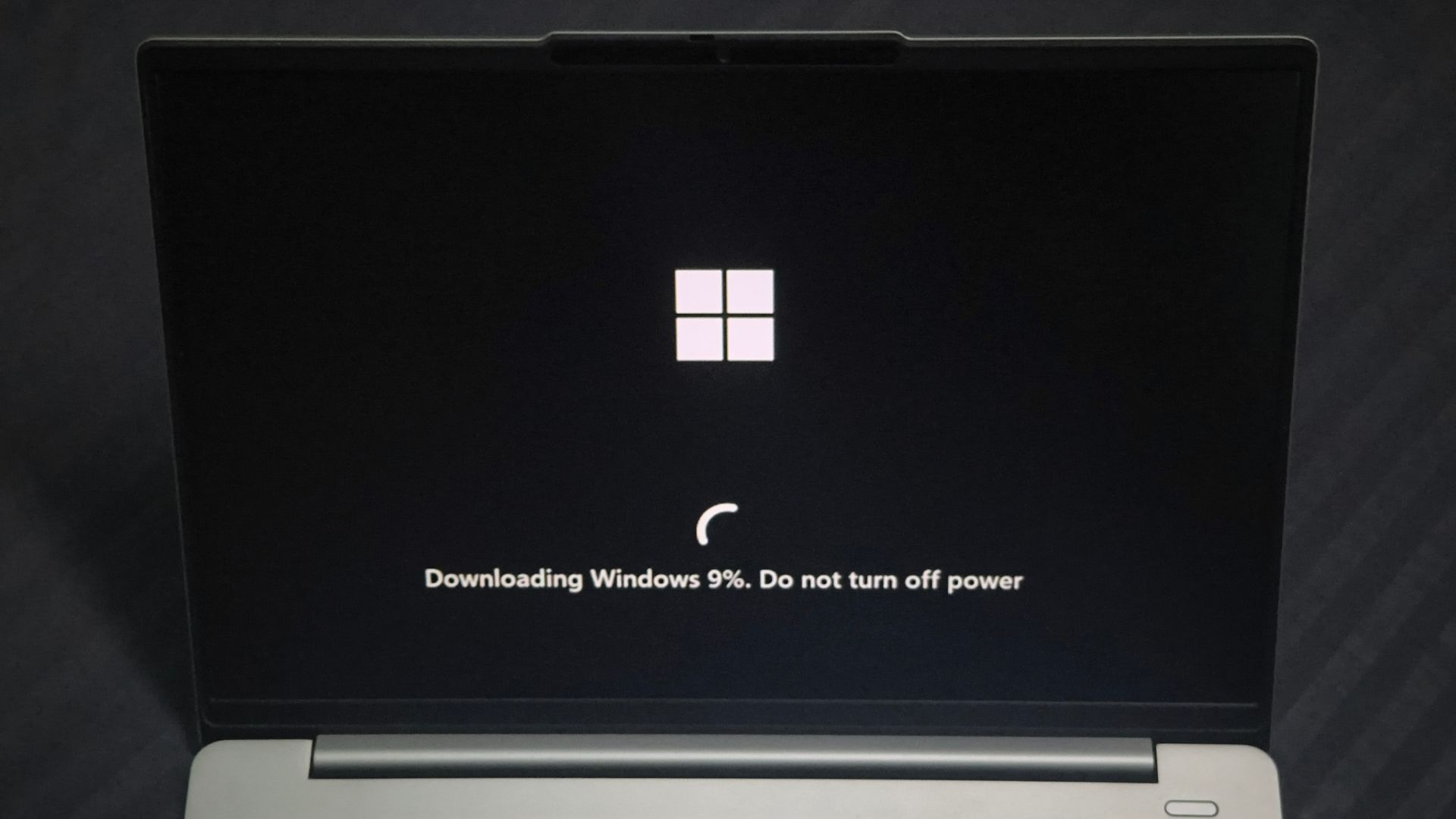
Cloud rebuild is a Windows 11 recovery option that can fully reinstall Windows from the Windows Recovery Environment using files downloaded through Windows Update, including drivers. Interestingly, it does not depend on the health of your existing Windows installation. Obviously, it does not need a USB installer either.
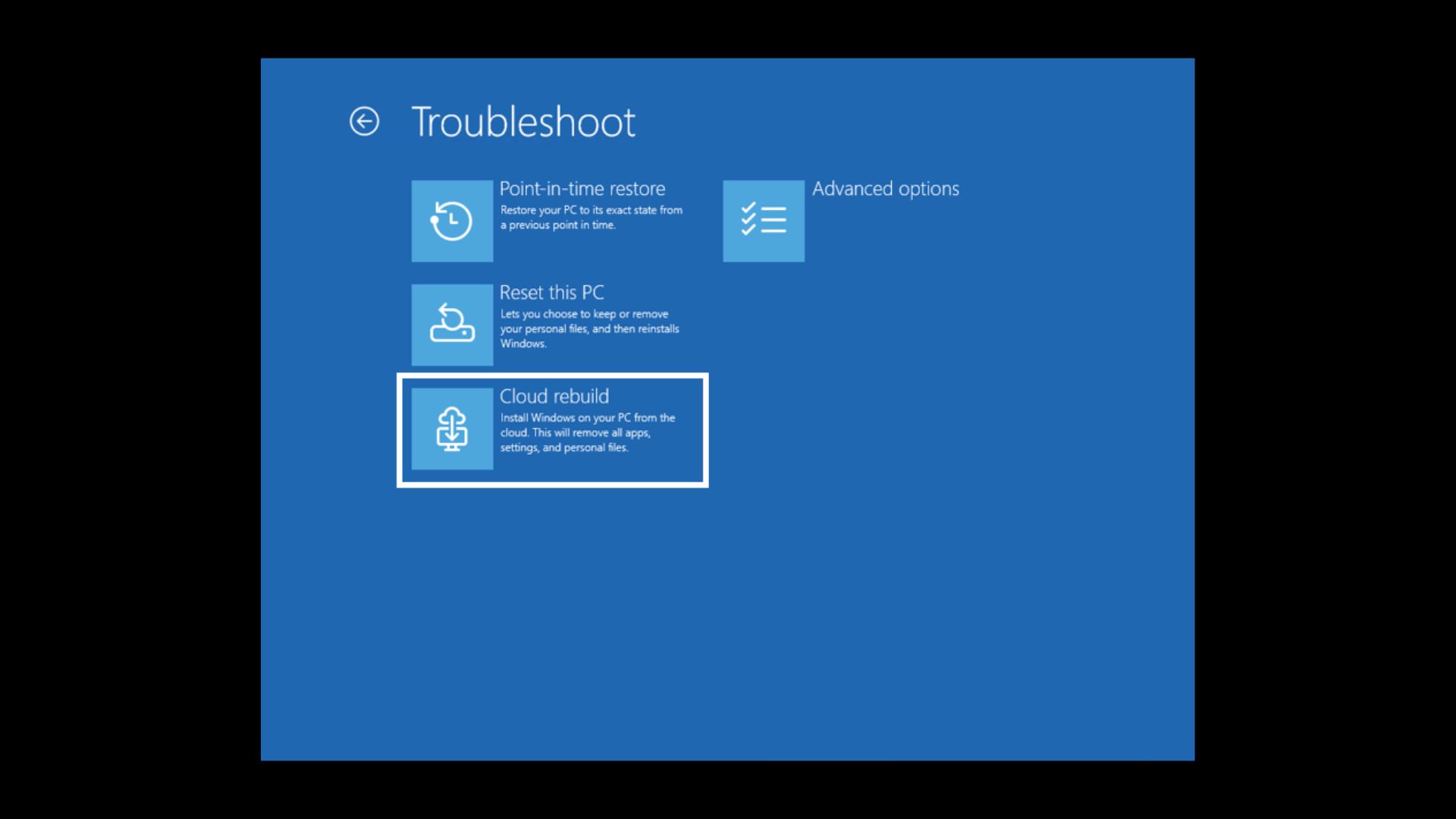
But now, Microsoft just added two brilliant capabilities to the feature in the Windows Insider Experimental Build 26340.9502, making it all the more useful for enterprises and IT admins. Cloud Rebuild can securely sanitize supported storage before reinstalling Windows, and IT administrators can configure and trigger rebuilds remotely through the Recovery CSP.
“This option is faster, but files might be recoverable using specialized recovery tools,” Microsoft warns in its Cloud Rebuild documentation, referring to the standard Remove files option.
In other words, reinstalling Windows and removing your files does not necessarily mean nobody can recover them afterward. The new Remove & sanitize files option asks the storage hardware to securely erase the data before reinstalling Windows, making it useful when you’re preparing to hand your PC to someone else.
Back in July, Cloud Rebuild started as a convenient way to reinstall Windows when a PC would not boot. It is now also useful for enterprises looking to recycle, reassign, or decommission their PCs.
Windows 11 Cloud Rebuild can now wipe a PC properly before it is decommissioned or reassigned
Microsoft’s changelog for Build 26340.9502 mentions that “Cloud rebuild can now sanitize the device’s drives as part of the rebuild.”
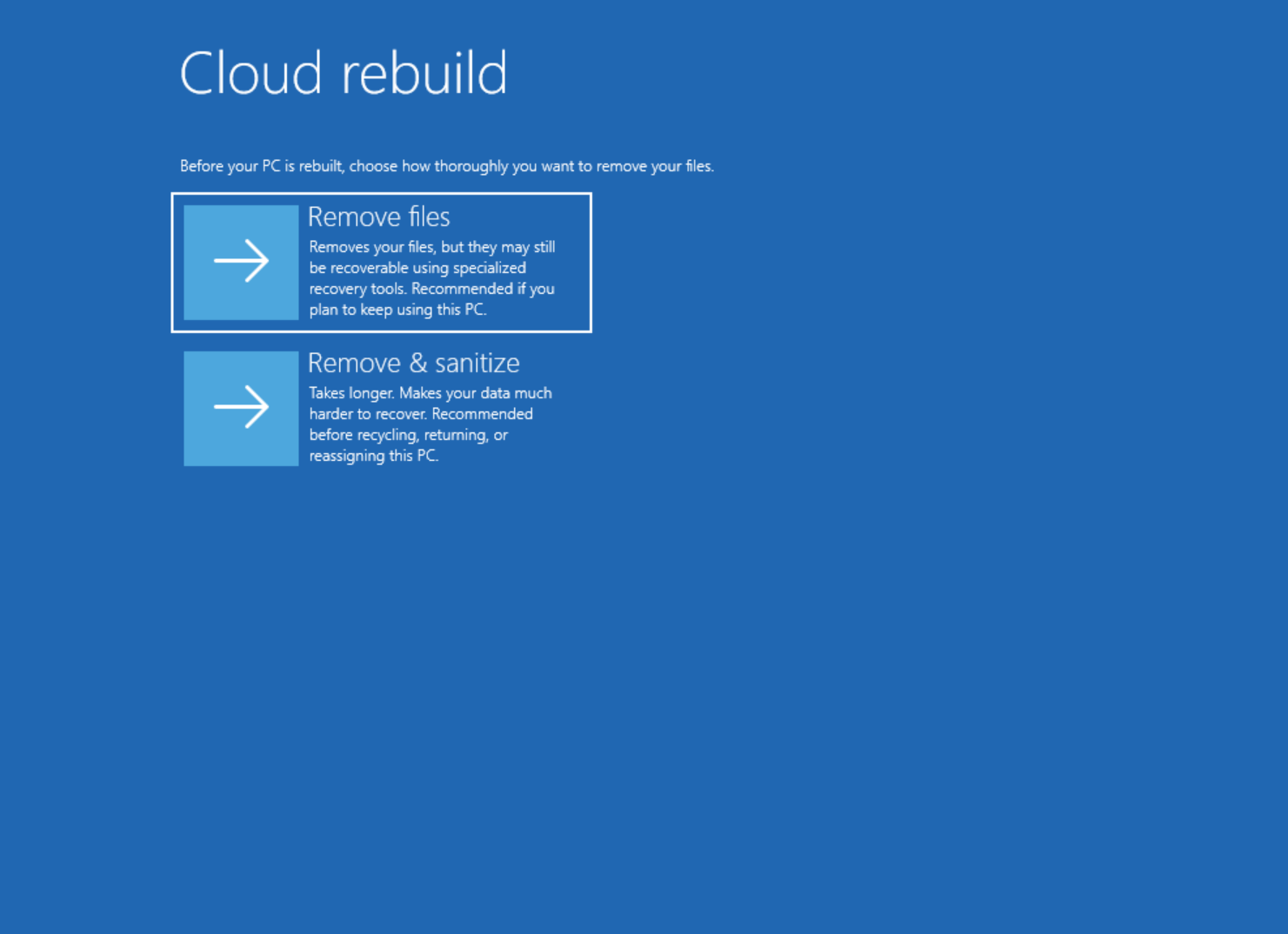
Cloud Rebuild gives you two choices:
- Remove files is for users keeping the PC. Windows reformats the system disk and clears local files, accounts, apps, and settings, and it is the faster option, though Microsoft warns the data could still be recoverable with specialized tools.
- Remove & sanitize files is for a PC being returned, recycled, reassigned, or decommissioned, and it asks the storage hardware to securely erase the data before Windows goes back on.
Sanitization is not the same as deleting everything thoroughly. Windows requests the erase operation from the storage hardware and reports back whatever result the drive returns, but it cannot independently verify what the hardware did.
For a device being retired or transferred under a regulatory or policy obligation, Microsoft recommends confirming hardware support first and using a manufacturer-provided tool if that confirmation is not available.
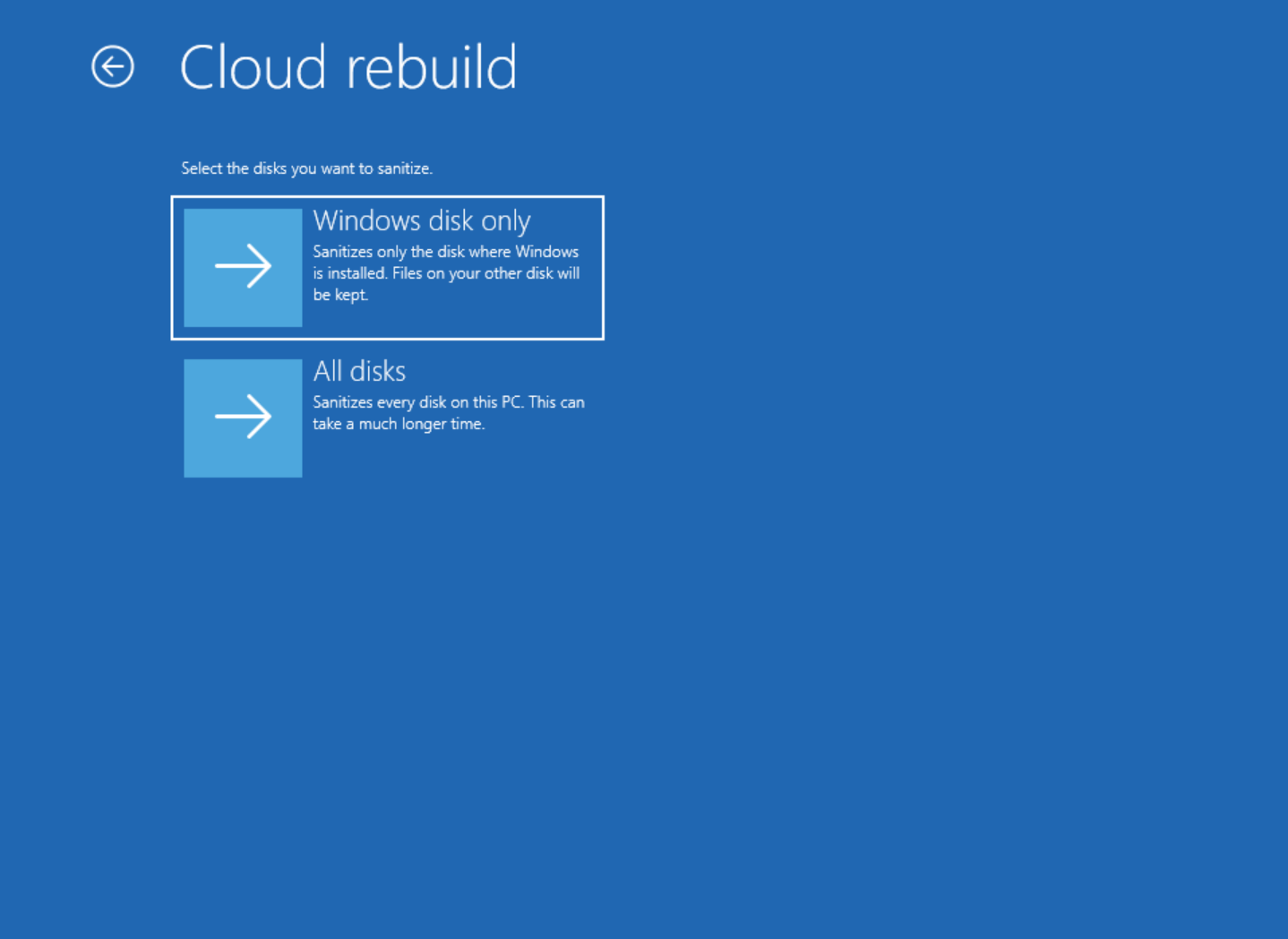
If the PC has more than one drive, you also choose which ones get sanitized. Windows disk only leaves other drives alone. All disks sanitizes everything and can take considerably longer, which is an expected caveat.
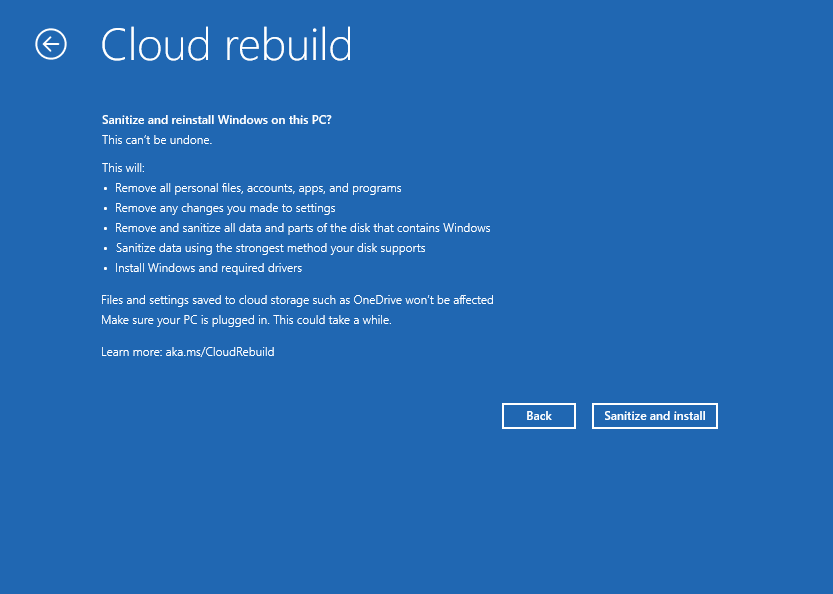
Remember, Sanitization is irreversible. Once the storage hardware erases the targeted data, the device cannot go back to its previous state. Of course, Cloud data (like OneDrive) is safe. Only local files are affected, which is why the feature may be a good fit for companies cycling laptops between employees or returning leased hardware. We are all never satisfied with a normal reset anyway!

Cloud rebuild started as a USB-free way to reinstall Windows when it won’t boot
When Cloud Rebuild first arrived on PCs in the Experimental Build 26300.8772, Windows Insider Program lead Stephen Lines mentioned it as a recovery option that restores a Windows 11 PC to a clean, known-good state through a full OS reinstall, even when Windows will not boot.
How Cloud Rebuild works
- Windows enters the Windows Recovery Environment, either automatically after repeated boot failures or manually through Settings > System > Recovery.
- You select Troubleshoot, then Cloud Rebuild.
- WinRE connects to the internet, either via Ethernet automatically or via Wi-Fi with a WPA-Personal network and password.

Cloud rebuild connecting to network - Windows Update determines the target build and grabs the networking drivers needed to continue.
- You see the target build, edition, and language before accepting a data-loss warning.
- Cloud Rebuild reformats the system disk, downloads and installs Windows with the required drivers.
- The PC boots into the normal setup experience.
Is Cloud Rebuild the same as Reset this PC?
In case you didn’t know, Reset this PC already has a Cloud download option, which comes as an option after you select Settings > System > Recovery > Reset PC.
But as Lines said: “Unlike Reset this PC, Cloud rebuild downloads both the target Windows image and the device’s drivers from Windows Update,” So, the device comes back fully functional without USB media, a custom image, or any dependence on the condition of the currently installed OS.
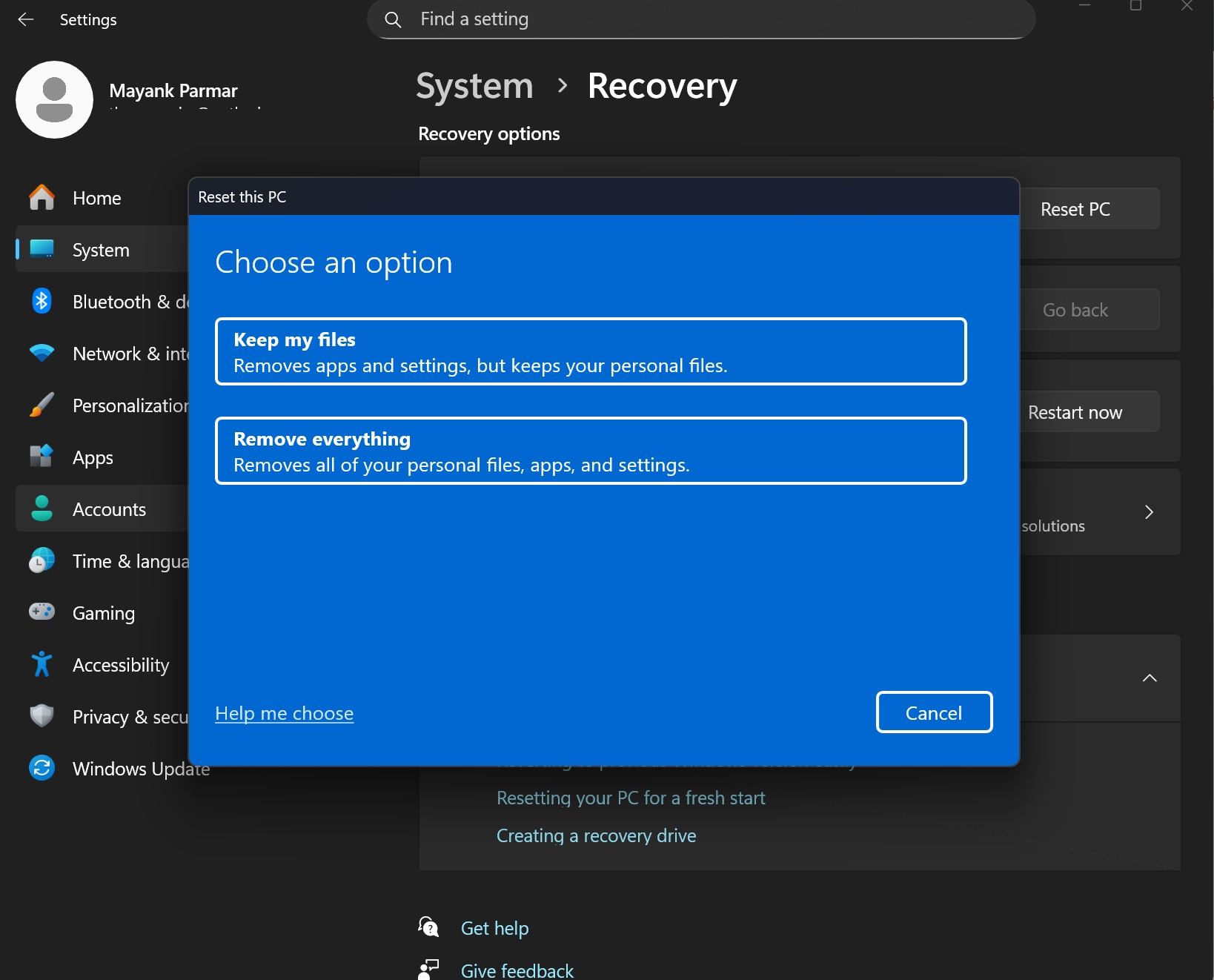
Microsoft positions it as a separate recovery path that does not depend on the integrity of the currently installed Windows environment, and it pulls both Windows and drivers from Windows Update. However, Microsoft has not fully explained the technical difference between the two, so it is too early to call this a completely new recovery engine.
When do you need Cloud Rebuild?
For a normal user, Cloud Rebuild is useful when Windows is severely corrupted, will not boot, a normal recovery attempt is not enough, you do not have a Windows USB handy, or you want a properly clean install with drivers already sorted. Again, this is not a repair tool that keeps your apps and files. Cloud rebuild will remove locally stored files, accounts, apps, and settings.
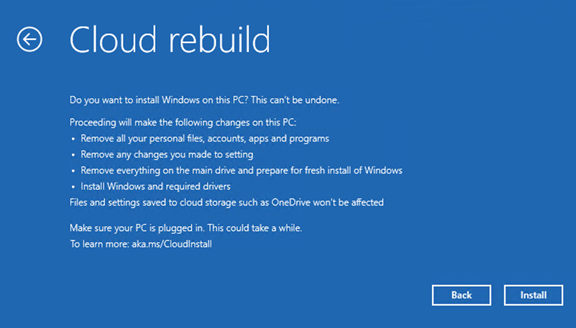
However, what we got now is the ability to remove all data and sanitize your drive, instead of giving up the chance of having data fragments. And this characteristic makes it a good candidate for enterprise.
Microsoft is turning Cloud rebuild into an IT recovery tool
The second major addition in September 18’s Build 26340.9502 is “IT administrators can now configure and start a Cloud rebuild remotely through the Recovery CSP, using either the currently installed build or a target build you specify.”
Until now, Cloud rebuild was mostly hands-on. Someone needed physical access to the PC and WinRE to use it. Microsoft is now letting an administrator configure and trigger the process remotely on managed devices instead.
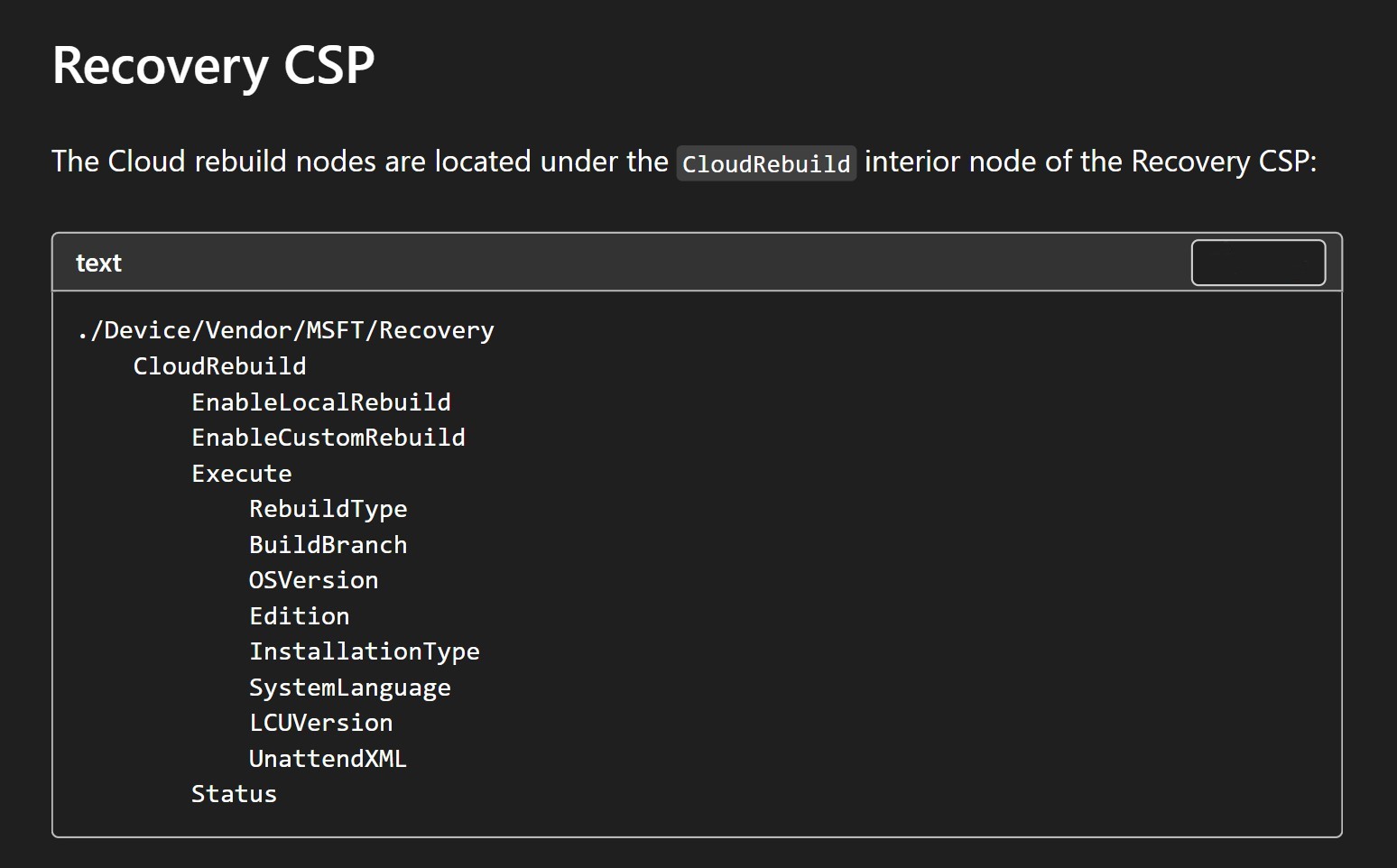
The controls are available under Recovery CSP, at ./Device/Vendor/MSFT/Recovery/CloudRebuild.
Microsoft’s support document says: “When enabled, Cloud rebuild scans the installed operating system to determine the target build to install. When disabled, this rebuild type is blocked for both locally initiated and remotely initiated Cloud rebuilds”
The following are what IT admins can do:
- Admins can allow or block rebuilding with the currently installed build.
- Allow or block rebuilding with a specified target build.
- Start a rebuild remotely on a managed device, and retrieve the result of the most recent remotely initiated rebuild.
For IT admins, the good news is the ability to choose the target build. An organization does not have to choose whatever build is available. Instead, an admin can configure a specific build branch, OS version, edition, installation type, system language, and even an unattend answer file, and Cloud Rebuild will install exactly that composition.
Microsoft has been building toward this for almost a year
Microsoft first described the idea of Cloud Rebuild in a November 18, 2025 Windows Experience Blog post from Dana Huang, Corporate Vice President of Windows Security, and Kristian Andaker, Vice President of Windows Servicing and Delivery, about Microsoft’s Windows Resiliency Initiative.
“Cloud rebuild offers a clean slate without shipping hardware or visiting a service desk.”, said Huang. The original enterprise vision had an admin selecting the desired Windows release and language through Intune, the PC downloading installation media and rebuilding itself, Windows Autopilot could handle zero-touch provisioning afterward, and OneDrive plus Windows Backup for Organizations can restore user data and settings.
- November 2025, Microsoft describes Cloud Rebuild as part of the Windows Resiliency Initiative.
- July 6, 2026, it arrives in the Experimental Channel with Build 26300.8772 as a local WinRE recovery option.
- September 18, 2026, Build 26340.9502 adds hardware-backed drive sanitization and remote Recovery CSP control.
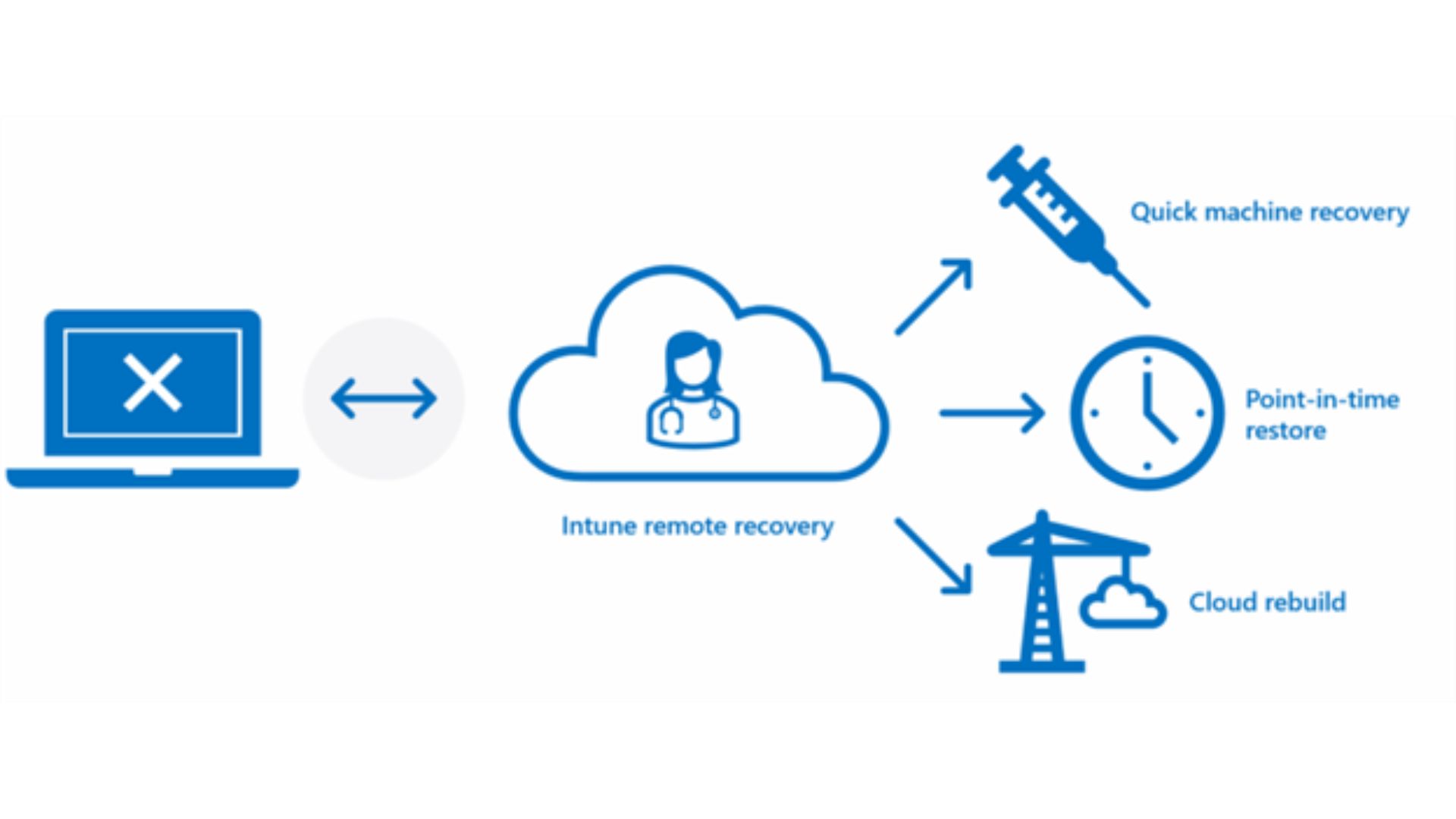
November blog also included Quick Machine Recovery, remote recovery through Intune, and Point-in-time Restore. While Point-in-time Restore is capable of rolling back a PC to an earlier working state using local shadow copies from the last 72 hours, useful for a bad update or driver. Cloud rebuild actually rebuilds the whole OS. Note that 26H2 now auto-enables Point-in-time Restore by default.
Prerequisites for using Cloud rebuild on your PC
The feature is not magic. Microsoft currently lists several prerequisites:
- Windows 11 (no support for Windows 10)
- A healthy Windows Recovery Environment
- A compatible networking driver in WinRE
- Internet connectivity from WinRE
- Hardware meeting Windows 11’s minimum requirements (so, it won’t work on older PCs where you bypassed requirements to install Windows 11)
However, you can overlook the networking requirement if you have Ethernet. Wi-Fi needs a supported WPA-Personal network and its password entered from inside WinRE, which, if you used it before, you’ll know that it’s more limited in usability.
Back up important data before starting, since Cloud Rebuild deletes the local Windows installation. For Data Sanitization, you have to keep the PC connected to power and do not interrupt the operation. As per Microsoft, interrupting a cloud rebuild can cause Windows to be unable to boot, and you may need a recovery drive or installation media.

As of now, Cloud rebuild is in preview. Microsoft says to evaluate it only on non-production devices, since features, UX, and command-line options can all change before general availability. If you have run into recovery reliability problems before, like when Microsoft broke Reset this PC with a 23H2 update in August 2025, you’ll need to take the “preview” part on a serious note.
Not so long ago, Windows recovery was about keeping a USB stick handy, finding the right ISO, hunting down drivers, and hoping the recovery partition does not break.
Cloud rebuild adds a clean Windows installation in the cloud, pulls drivers from Windows Update, runs from WinRE when the normal OS cannot help, and now adds secure storage sanitization and remote management for organizations.
After years of blue screen criticism, to the point that even Apple mocked the OS, Microsoft is now making recovery a first-class part of Windows, along with Point-in-time Restore and Quick Machine Recovery. Yes, there are a lot of options here, but the fact is, nobody cares about recovery until Windows stops working.