







This week’s mandatory Windows 11 update has finally removed WMIC, one of the tools that ransomware abused. You might have never heard of WMIC if you never worked in an enterprise environment, but the risk wasn’t limited to businesses. Regular consumers could also be affected if WMIC was installed on their PCs.
WMIC, better known as Windows Management Instrumentation Command-line, has been a part of Windows for decades, and it isn’t malware itself. It’s a legitimate command-line tool that allowed users, mostly enterprises, to query and manage Windows PCs through Windows Management Instrumentation (WMI). But those outside IT departments also used it, including for managing Windows and automation, which is why WMIC was preinstalled on consumer editions as well.
Microsoft deprecated WMIC with the release of Windows 10 version 21H1 in May 2021, but it remained preinstalled as a Feature on Demand. With Windows 11 KB5124008, the September 2026 Update, WMIC is now fully removed and is no longer available as a Feature on Demand.
Microsoft recommends migrating apps, scripts, and workflows that still depend on WMIC to supported alternatives rather than bringing the utility back.
WMIC allowed ransomware to attack everyone, including consumers
WMIC-related abuse also affected ordinary home users, and one of the most common tactics was destroying Windows’ Shadow Volume Copies.
For those unaware, Windows maintains Shadow Volume Copies that can help you recover previous versions of files, including personal files. Windows recovery features are also built around the broader idea of restoring an earlier state.
Bad actors that abuse WMIC can first attempt to delete Shadow Volume Copies, so you cannot easily go back to a previous state or recover data after ransomware encrypts it. And this isn’t just theoretical because we’ve already seen credible reports that TeslaCrypt 4.1b, one of the known ransomware strains, used WMIC to delete Shadow Volume Copies from an infected PC.
Windows Latest understands that WMIC was also abused by Serpent, WhiteRose, Zenis, Saturn, and numerous other ransomware families.
Even the infamous WannaCry ransomware deleted Shadow Volume Copies, disabled Windows startup recovery, and removed backup information. One of those commands invoked WMIC to delete shadow copies.
I am not saying that WMIC caused the original WannaCry infection, but ransomware could abuse the legitimate tool already available on Windows unless it had been manually disabled or removed.
WMIC has also been abused to interfere with Windows antivirus protection. For example, one trojan used WMIC to find out whether Windows Defender was running and then added itself to Defender’s exclusion list.
In 2021, the same year Microsoft declared WMIC deprecated, attackers distributed DeroHE ransomware through forums. That ransomware also used WMIC commands to add Microsoft Defender exclusions.
In our investigation, Windows Latest found that removing WMIC could instantly disrupt some attacker techniques and ransomware tactics that specifically depend on the utility. Bad actors now need to find an alternative or somehow convince you to install WMIC again.
How to verify if WMIC has been removed from Windows
First, make sure you’ve installed the September 2026 Update from Windows Update. It shows up as Windows 11 KB5124008 and bumps PCs to Build 26200.9445. If you’re on Build 26200.9445 or newer, you’re protected. This build drops WMIC and also patches hundreds of major security issues.
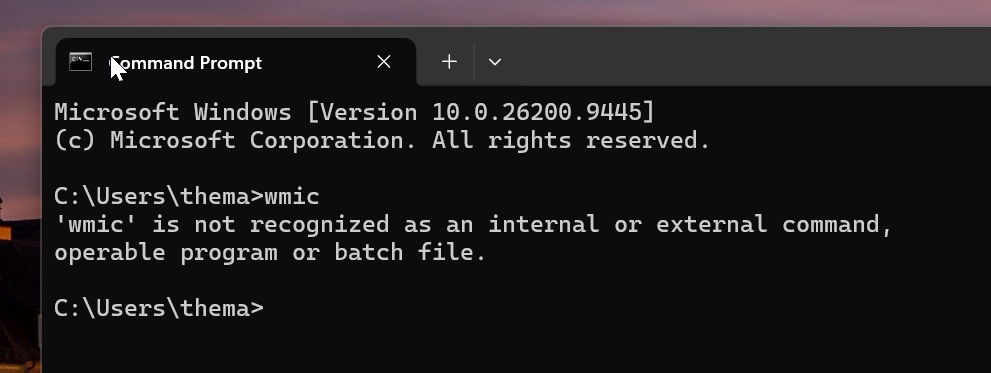
In Windows 11 Build 26200.9445 or newer, if you open Terminal/Command Prompt and type WMIC, it will throw an error that the command is not recognized. This confirms WMIC is gone for good.
Previously, if you used the WMIC command, it showed a brief description of how to use the command-line tool.
Microsoft says don’t restore WMIC unless you really need it
I found a Microsoft support document that actually allows you to restore WMIC through a downloadable package, but the company makes it clear that this is intended for apps, scripts, or workflows that still depend on the utility.
If you don’t know what WMIC is, you probably don’t need to install it. And if a third-party app or an untrusted website suddenly tells you to download WMIC, you should be very careful before doing so.
For organizations that still depend on it, Microsoft offers the downloadable package as a temporary compatibility workaround, but it wants users to move to supported alternatives.
“We encourage you to move away from this workaround as soon as possible,” Microsoft warned anyone who still plans to force-install WMIC.