







Microsoft has just released its September 2026 Patch Tuesday updates, with the movable taskbar being the talk of the town, but there’s more to the story than fancy features. 974 Microsoft CVEs (Common Vulnerabilities and Exposures) overall have been addressed this month, and that includes at least 723 known vulnerabilities across the Windows product family.
Based on my analysis, 611 unique security flaws map specifically to Windows 11 24H2 and 25H2. My 611 count does not include Windows Server, so including Windows Server raises it to 723. And when you consider all Microsoft products covered by the release, you’ve got a huge 974 figure.
Unless you use the PC offline, I don’t think you should delay security updates anymore, and my recommendation aligns with Microsoft’s recently updated guidelines.
In July 2026, Microsoft warned against delaying Windows updates, as AI-enabled threats are accelerating at an alarming rate.
Microsoft 365 director Jeremy Chapman noted that you should not delay quality updates like the September 2026 update by more than three days, and if the update has a zero- or one-day deadline, it has a grace period of no more than two days. If you put that simply, do not pause Windows updates!
Microsoft says bad actors are using AI to come after your vulnerable products
Microsoft previously warned IT admins that attackers have “ample time” to use AI and “find and exploit known security gaps” if you’re sitting on critical quality updates with security fixes for a “couple of weeks.”
“If you’re not delivering critical quality updates with security fixes until a couple of weeks after they’ve been issued, that’s ample time for attackers using AI to find and exploit known security gaps,” the Microsoft 365 director warned.
“To address this, we’ve updated our recommendations for deploying Windows updates to less than three days as the deferral period for quality updates, setting deadlines for those updates to zero or one day, and the update grace period to a maximum of two days.”
Jeremy Chapman, a director at Microsoft 365, shared the following security advisory for everyone, particularly IT admins:
Do not delay Windows 11’s September 2026 Update
Windows 11’s September 2026 Update is one security update I would not delay, as it fits Microsoft’s new recommendations.
In its Security Update Guide, Microsoft noted that the September 2026 security release consists of 974 Microsoft CVEs across its products. Tom Gallagher, Vice President of Engineering at the Microsoft Security Response Center (MSRC), also highlighted the 974 figure.
The 974 CVEs, which is the number Microsoft’s own security release quotes, include vulnerabilities in products such as Office, SQL Server, Azure, Exchange Server, SharePoint Server, and developer tools.
Some of these products obviously run on Windows, but Microsoft tracks their vulnerabilities separately from the Windows product family.
Of those, Microsoft lists 723 vulnerabilities as addressed under the Windows product family, which covers multiple versions of Windows and Windows Server. Based on my calculations, 611 unique CVEs map specifically to Windows 11 25H2 and 24H2. Server-only vulnerabilities are not included in the 611 figure.
| September 2026 security fixes | Count | Explanation |
|---|---|---|
| Microsoft security release | 974 | Microsoft CVEs across all affected product families |
| Windows product family | 723 | Windows and Windows Server vulnerabilities |
| Windows 11 24H2 and 25H2 | 611 | Unique CVEs that map to the September 2026 fixed builds for Windows 11 24H2 and 25H2 |
For the Windows 11 calculation, I looked at Microsoft’s CVE data and counted unique vulnerabilities that map to Windows 11 24H2 Build 26100.9445 and Windows 11 25H2 Build 26200.9445, delivered with KB5124008.
How to check if your PC is protected
Windows Updates like today’s release are installed in the background, and reboot when you’re away from the PC. To verify if it’s already installed, press Win + R, type winver, and press Enter.
If you’re on Windows 11 25H2, you should be on Build 26200.9445 or newer.
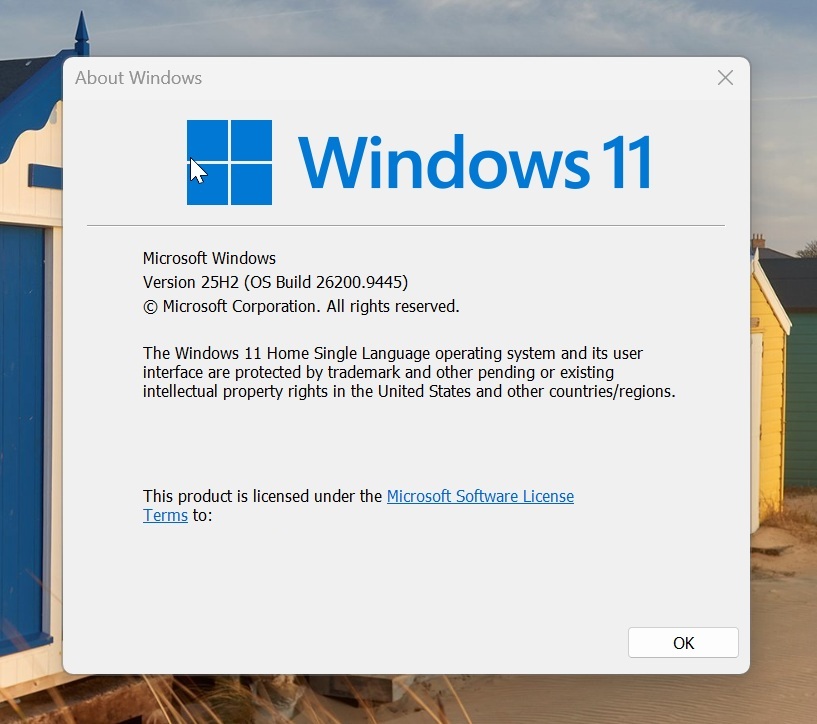
If you’re still on Windows 11 24H2, you should be on Build 26100.9445 or newer.
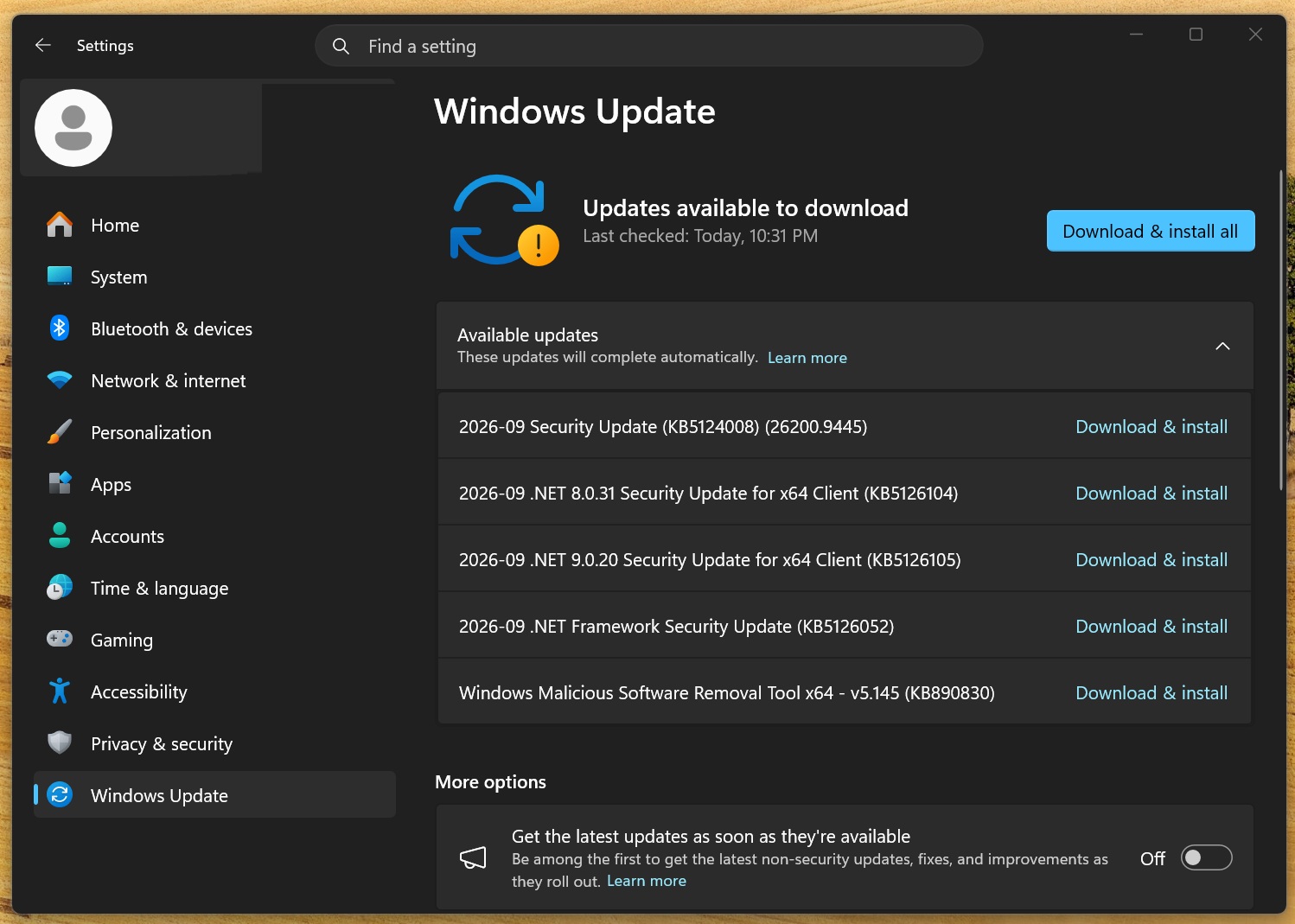
If your build number is lower, open Settings > Windows Update and check for updates. Once Windows 11 KB5124008 or a newer update is installed, your PC includes these security fixes. Here’s what it looks like when I check for updates, and the above patch is not installed:
Microsoft security updates have exploded in 2026
The increase becomes clearer when you compare Microsoft’s own release-day CVE totals for each Patch Tuesday:
| Month | Microsoft CVEs in 2025 | Microsoft CVEs in 2026 | YoY |
|---|---|---|---|
| January | 159 | 112 | -29.6% |
| February | 63 | 59 | -6.3% |
| March | 57 | 83 | +45.6% |
| April | 126 | 165 | +31.0% |
| May | 78 | 137 | +75.6% |
| June | 66 | 206 | +212.1% |
| July | 130 | 622 | +378.5% |
| August | 111 | 421 | +279.3% |
| September | 86 | 974 | +1,032.6% |
| January-September | 876 | 2,779 | +217.2% |
Note: I extracted these numbers from Microsoft’s security portal, and they include release-day CVE totals. The company can revise older entries after release, and the final numbers could end up being higher.
For the above table, I also added YoY growth for the bugs (why let only the company’s revenue growth get all the attention!). From January through September, Microsoft’s release-day CVE total climbed from 876 in 2025 to 2,779 in 2026, an increase of 217.2%.
September alone is up more than 1,000% year over year, and I can tell you with confidence that it’ll get worse in the coming months.
What does Windows 11’s September update actually fix?
Whether you look at Microsoft’s 974 security fixes or my Windows 11 24H2/25H2-only figure of 611, those are huge numbers, and they tell you that something is very wrong with the products we use in our daily lives.

The September security fixes reach some of the most fundamental parts of Windows, including Windows Update, Windows Hello, biometrics, and the Windows graphics stack:
| CVE | Windows component | Type | Meaning |
|---|---|---|---|
| CVE-2026-81963 | Windows Update Stack | Elevation of privilege | Microsoft says exploitation has already been detected |
| CVE-2026-69784 | Windows Hello | Elevation of privilege | Use-after-free vulnerability affecting Windows 11 24H2 and 25H2 |
| CVE-2026-73017 | Windows Graphics Kernel | Remote code execution | Could allow an authorized attacker to execute code |
| CVE-2026-83979 | Windows Biometric Service | Elevation of privilege | Use-after-free vulnerability affecting the Windows biometric stack |
For example, the most urgent security issue is labeled CVE-2026-81963, which is an elevation-of-privilege vulnerability in the Windows Update Stack.
In its advisory, Microsoft says the vulnerability is caused by improper link resolution before file access in the Windows Update Stack, which could allow an authorized local attacker to elevate privileges.
Why are Microsoft security updates getting so much larger?
Windows has not suddenly turned into a security disaster, and Microsoft anticipated that we’d all be highlighting these huge numbers, so it was prepared with a valid explanation.
In May 2026, Microsoft itself confirmed that Patch Tuesday updates would become larger in the coming months because reporting volume is climbing and the company’s in-house AI models have matured, so it’s able to find more bugs in a short span of time. It’s also because more researchers are now participating, and Microsoft is using AI to find bugs faster than ever.
At the same time, attackers are also using AI to find and exploit known security gaps faster. It’s a cat-and-mouse game, and Microsoft can’t afford to lose it, so it’s rapidly investing in its own AI models.
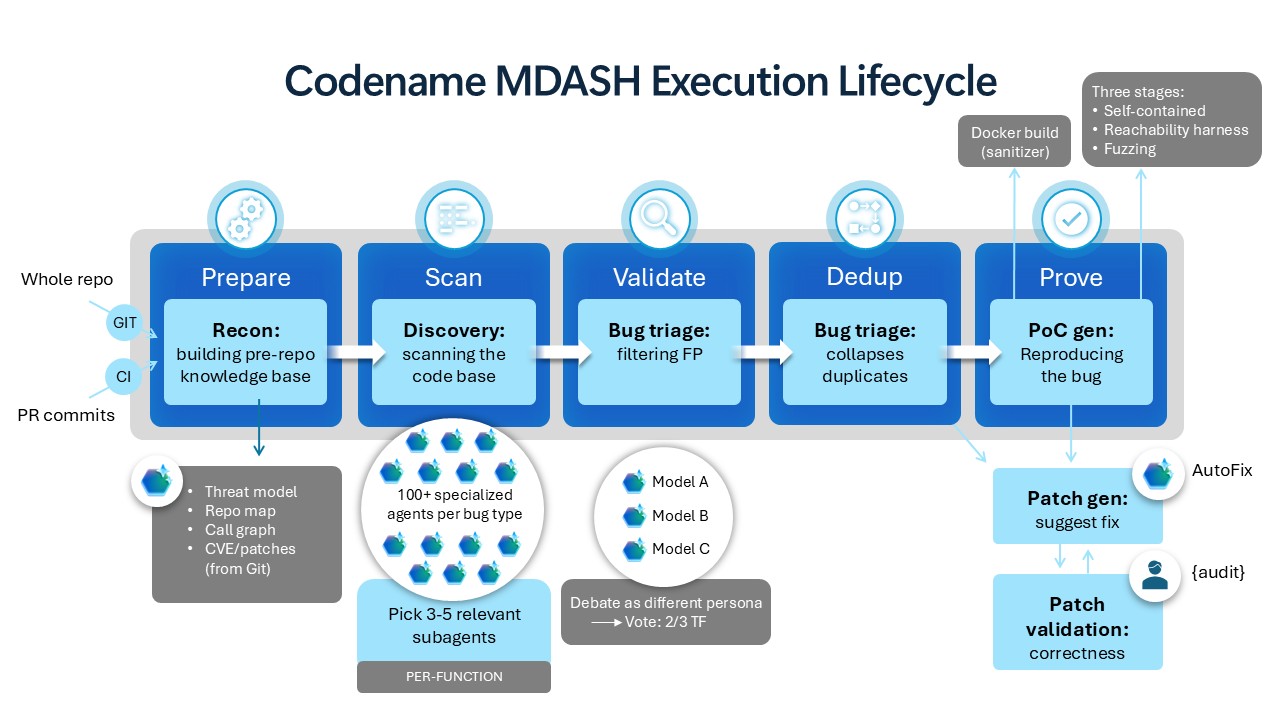
More recently, Microsoft confirmed it’s deploying MDASH to find bugs in Windows, and described it as an “agentic vulnerability discovery and remediation system.” And you can expect the system to get even better in the coming months, so the number of bugs in Windows is only going to increase from here.