






Some of the most popular apps in Windows 11 use so much RAM that they can impact your PC performance, and the fact that RAM prices are soaring high makes matters even worse. The issue is due to the trend of developers preferring web apps instead of native apps on Windows.
Very recently, Windows Latest reported how RAM-intensive apps like Discord, Teams, and the new WhatsApp are, even while in the background. The common factor here is that these are communication-centric apps, and as you’d expect, they need to be kept alive even when you’re not using them.
However, our testing proved that native versions of the apps (like the old WhatsApp) were not consuming a lot of RAM. These are some of the most used apps in Windows, regardless of what domain people are in.
So, why don’t these apps have native versions? Is it that difficult for these companies to build native and optimized versions for the most popular desktop operating system?
The worst RAM offenders on Windows 11
There hasn’t been a more relevant time to talk about RAM usage, as it becomes a very expensive hardware upgrade for PCs and laptops. And it is worsened as Micron is leaving its consumer RAM business.
Windows 11 was already criticized for having a higher RAM requirement when launched, but in 2025, things have gotten worse as major communication apps in Windows are binging on RAM like it’s a free resource.
Discord always uses around 1GB and happily spikes to 4GB of RAM
Discord, famous among gamers and online communities, is the easiest to pick on as the company has already admitted the RAM issue. The Windows client is built on Electron, which means you are running a Chromium browser instance plus Node.js as a desktop app. Each server, channel, and every extra feature you open adds more tabs to that internal browser.
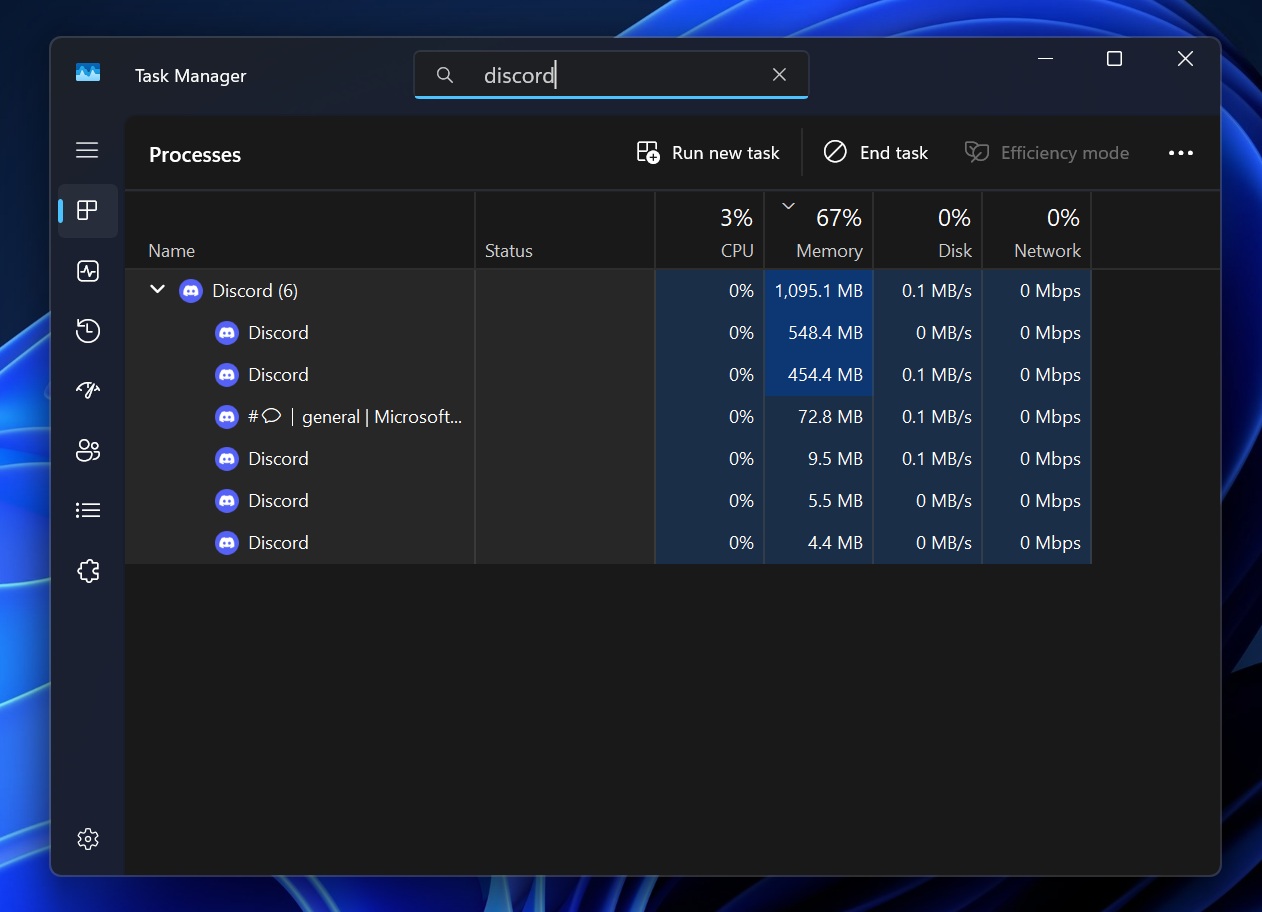
Discord told users that normal usage sits under 1 GB of RAM, but under real-world conditions, it can hit 4 GB, which is when the company started testing the now infamous “auto restart when memory exceeds 4 GB” experiment.
If the app has been open for at least an hour, you are idle for 30 minutes, and you are not in a call, Discord will silently restart itself once in a 24-hour window to claw back memory.
The company explains that the restart is in good faith. However, we feel that this is a band-aid fix for a fundamental issue. Either way, developers at Discord have been busy fixing genuine memory leaks and claims about a 5% reduction in high percentile memory usage.
That being said, Electron is a full browser stack for every app, so your PC ends up paying for a rendering engine, a JavaScript runtime, and security sandboxes just to render a chat UI.
The good news here is that Discord wants to fix things, but the bad news is that the company isn’t exactly profitable, despite being in the industry for 10 years. So we can’t really expect the company to invest in a native app. The company also doesn’t have a native macOS application.
WhatsApp went from a fast native app to a sluggish web wrapper
WhatsApp for Windows is a different kind of tragedy, because it was good before. The old UWP and WinUI-based client was lightweight, snappy, and felt right at home on Windows 11. Even in heavy day-to-day use, with hundreds of chats and active groups, it typically stayed under 100MB idle and around 250 MB when you scroll fast through long conversations.
Then Meta shipped the new version built as a WebView2 wrapper, which simply loads web.whatsapp.com in a Chromium-based container. In our testing, the new app already sits around 300 MB of RAM before you even log in. Once chats sync and you start scrolling, it easily jumps toward 1.2 GB, with CPU usage spiking far higher than before.
The performance issues aren’t limited to RAM. The UI feels like it runs at a much lower frame rate, chat switching has a visible delay, and even on decent hardware, it leaves a constant sense of heaviness. Closing the window does not actually quit the app. It minimises to the tray and keeps a chunk of RAM reserved in the background so it can receive notifications via service workers, something the native app did not need.
All of this happened in the name of “simplifying development” and reusing the web codebase, but for users, it is a straight downgrade. On macOS, Meta still ships a native WhatsApp app. On Windows, the platform with far more users, the best they can do right now is a browser window. This is pure laziness on Meta’s part, and it’s not like the company can’t afford it either.
Teams; even Microsoft doesn’t care
Then there is Microsoft Teams, which moved away from Electron to WebView2. This may sound like progress on paper. However, in reality, it is still a web app by all means. Teams routinely sit at around 1GB RAM while idle.
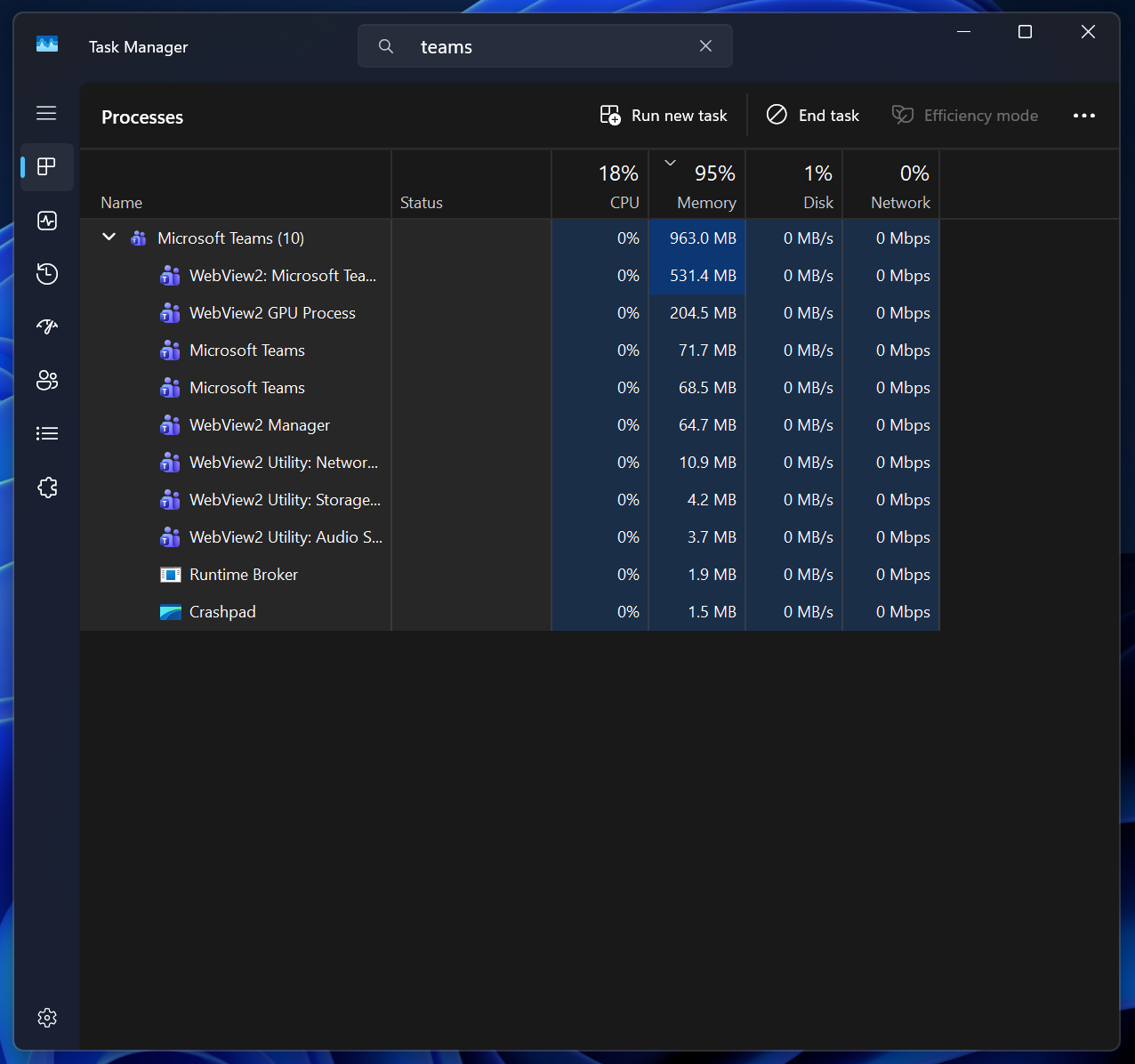
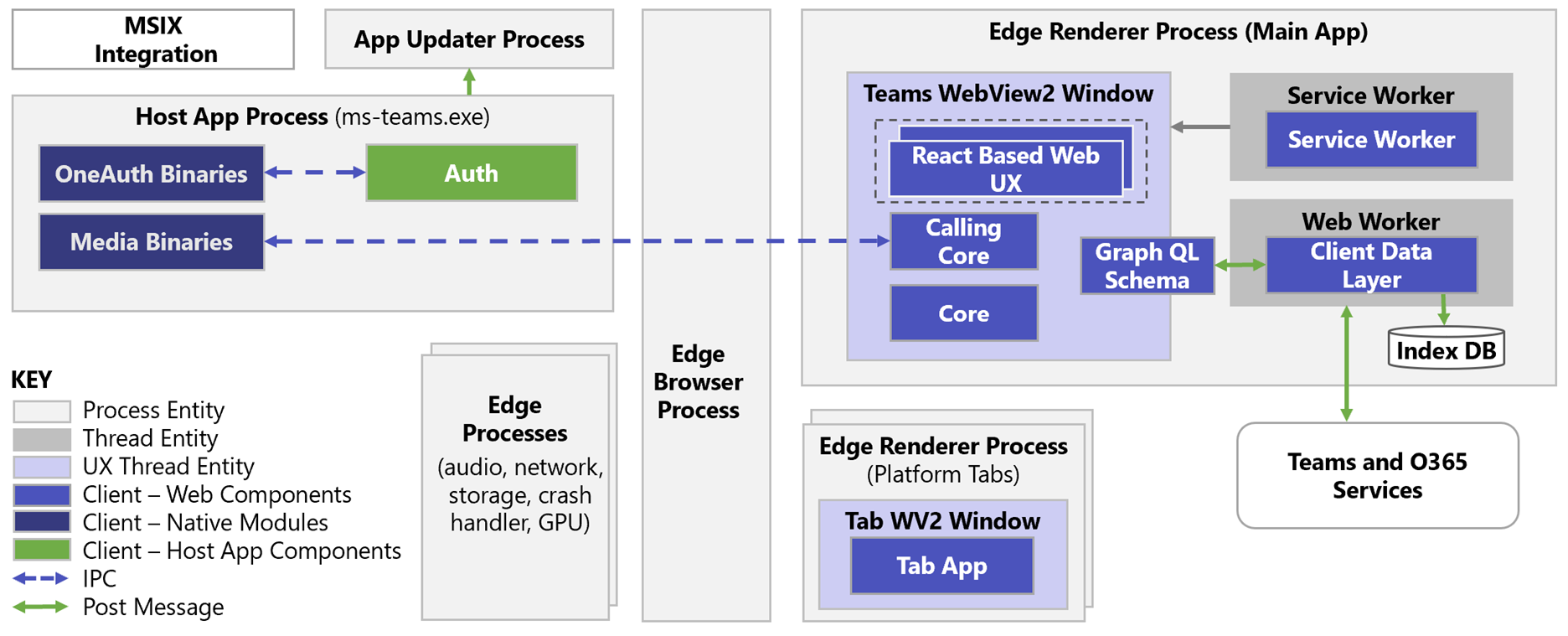
Microsoft acknowledged the problem by restructuring the app, instead of rewriting it. Starting in early 2026, Teams will introduce a new process called ms-teams_modulehost.exe that handles calling features separately from the main ms-teams.exe process.
This doesn’t change the fact that everything is still running on top of WebView2, with the usual suspects in the background.
We do not know what to say about this situation, especially when Microsoft literally has its enterprise customers relying on Teams for everyday communications.
At this point, we do not expect Microsoft to care if other developers create native Windows apps or if they move their existing native apps to web apps, like what Meta did.
The truth is that web browsers these days use an obscene amount of RAM, and any app built on it will just eat through RAM. The worst of the bunch is communication apps, as they literally need to be ON at all times.
Why does every modern Windows app use so much RAM
Most new Windows apps today on the Microsoft Store are not really Windows apps, but browser engines. Discord uses Electron. WhatsApp and Teams use WebView2. Many smaller apps use PWAs. But all these share the trait of embedding a full Chromium runtime inside the app.
Every Electron app has its own JavaScript engine, GPU renderer, networking stack, audio pipeline, and sandboxed subprocesses. Even a small UI element can generate another process because of modern browser security standards. Each chat, server, channel, call view, or settings panel is actually a separate sandboxed world. So, memory usage grows horizontally as features run in parallel.
WebView2, the framework used by Teams and WhatsApp, avoids opening its own Chromium copy, but the design remains similar. You may think the new WhatsApp on Windows is a simple list of chats. In reality, it is a miniature browser tab with all the layers of Chrome running under the hood.
PWAs, like the Reddit app on Windows, behave the same way, as they also rely on Chromium’s multiprocess architecture and background service workers.
Technically, WebView2 is better than Electron
Since every Electron app opens like a full browser, it increases size and RAM usage but it will be consistent in cross‑platform behavior across Windows, macOS, and Linux. WebView2 apps use the existing Microsoft Edge (Chromium) installation on Windows to render web content inside native apps. So, it reduces the overhead and footprint since it doesn’t open its own browser. Of course, there is a small limit in portability because it is tied to Windows and requires the Edge runtime.
Either way, these architectures are not inefficient by accident. Developers know this, and it exists to prevent exploits and security issues.
Modern browsers implement process isolation to stop malicious pages from interacting with what the user is viewing. They split memory pools across sandboxes. They keep rendering away from logic and logic away from storage. This extra use of resources is the price that we have to pay for security. So, the excess RAM usage is unavoidable when you choose a browser engine as the foundation for a desktop app.
On top of all this, modern JavaScript frameworks take their fair share of RAM. Large bundles, heavy diffing algorithms, virtual DOM layers, and client-side state machines all stack on top of the already high browser’s RAM usage. Essentially, even well-optimized web wrapper apps have a high baseline memory usage.
Memory leaks are everywhere
Memory leaks occur when JavaScript references are not released properly or when event listeners accumulate over time. It’s frequent when frameworks keep idle objects alive in their internal caches. It also happens when browser processes fail to release memory inside long-running sessions.
Once memory leaks begin, they grow into multi-gigabyte spikes, like the ones we saw with Discord. This is common across Electron, Chromium Embedded Framework (CEF), and WebView2 apps, and the debugging tools for complex JS stacks are nowhere near as mature as native debuggers.
The uncomfortable truth is that we know companies monitor RAM usage, and all they can do is push patches that may fix small pockets of memory issues. But the entire stack hides too much behind abstractions.
You cannot see what Chromium is doing at a low level. You cannot force its renderer to release memory more aggressively. You cannot rewrite the multiprocess model. There is an unavoidable limit to how much you can optimize the framework for memory usage.
Why companies keep shipping web apps instead of native apps
With all these issues, you might wonder why companies develop web apps anyway. Don’t they value their users having a smooth UI?
The straightforward answer is cost. A single JavaScript codebase can technically run on Windows, macOS, and Linux with very little modification. It is far easier to hire JavaScript developers than C++ developers.
Onboarding new hires is faster, and development cycles will be shorter. Also, teams will be able to ship features across platforms simultaneously. Most companies have pressure to ship their apps faster, and at that time, developing native apps isn’t a practical solution.
Companies also argue about brand consistency, which is senseless, to be honest. The idea is that companies want their UI to look identical across every device. Web wrappers can do that. But different OS platforms have different looks, well, not in Windows, which is a story for another day. For a better example, think of Apple’s Liquid Glass design. The whole OS has this design, but if a brand’s app looks completely different, it takes away from the experience.
The most pathetic part is that companies no longer see Windows native apps as a priority. We have already seen Meta retire UWP WhatsApp, despite it working mostly well. Messenger disappeared entirely from the Microsoft Store. Facebook and Instagram are now web wrappers.
Even Microsoft does not lead by example, since Teams is still a WebView2 app, and LinkedIn, which they acquired for 26.2 billion in an all-cash deal, is a mere web wrapper.
What’s borderline funny is that the upcoming Agenda view in Windows 11 Notification panel uses WebView2 instead of the native XAML/WinUI. That’s a literal part of the OS that Microsoft made as a web wrapper. It even uses more RAM when you interact with it. Is there any point in blaming other Meta or other companies?
Apple enjoys a more optimized and native app catalogue
Apple users are far less tolerant of low-quality apps. They demand fast, smooth native experiences. That pressure forces developers to invest in native macOS apps, even when it is more expensive. Not to mention the difficulty of creating native apps on macOS.
Surprisingly, developing Windows native apps is easier than macOS apps, and it’s because Microsoft provides a unified ecosystem with mature frameworks like .NET, WPF, AND UWP/WinUI. All of these are tightly integrated with Visual Studio and have extensive backward compatibility as well.
macOS development requires working with Cocoa and Swift/Objective-C APIs through Xcode, which has stricter sandboxing, signing, and App Store distribution rules. Windows developers also have access to a wider language support with far fewer gatekeeping constraints. As expected, macOS developers have to deal with a steeper learning curve due to Apple’s rigid ecosystem and the use of platform-specific APIs.
But Windows users have grown used to web-based desktop software, and the developers are aware of this. As long as the app works, even if it is slower, the backlash tends to be mild. So, companies respond accordingly by investing less.
It’s all because of Apple’s initial reason not to ship budget PCs. Now, most of their customers have a higher purchasing power, and the entire company is seen as a luxury brand, which is why the upcoming budget MacBook can cause a serious headache to PC manufacturers.

Persuading companies and their developers to write native code for Windows, just for optimization and less RAM usage, thus becomes unrealistic when the browser-based model is cheaper, can be shipped anywhere, and the users don’t complain as much.
RAM prices are rising, and this is not going to change
The timing of all this could not be worse. RAM prices have almost doubled in many cases, largely driven by supply cuts to regular consumers, aggressive DDR5 pricing cycles, and the biggest of them all is the overwhelming demand created by AI data centers. Memory manufacturers now prioritise these high-margin enterprise chips.
There is no magic fix for the current state of Windows apps. Microsoft has the biggest role to play here, as we don’t see any benefit for developers. The company can push developers toward native tooling again, refine WinUI to make it more attractive, and show that core system quality still matters by fixing long-standing problems in Windows.
If Windows is going to be in a world built on browser-based apps, the platform first needs to lead by example and give both users and developers a better foundation to work with.