








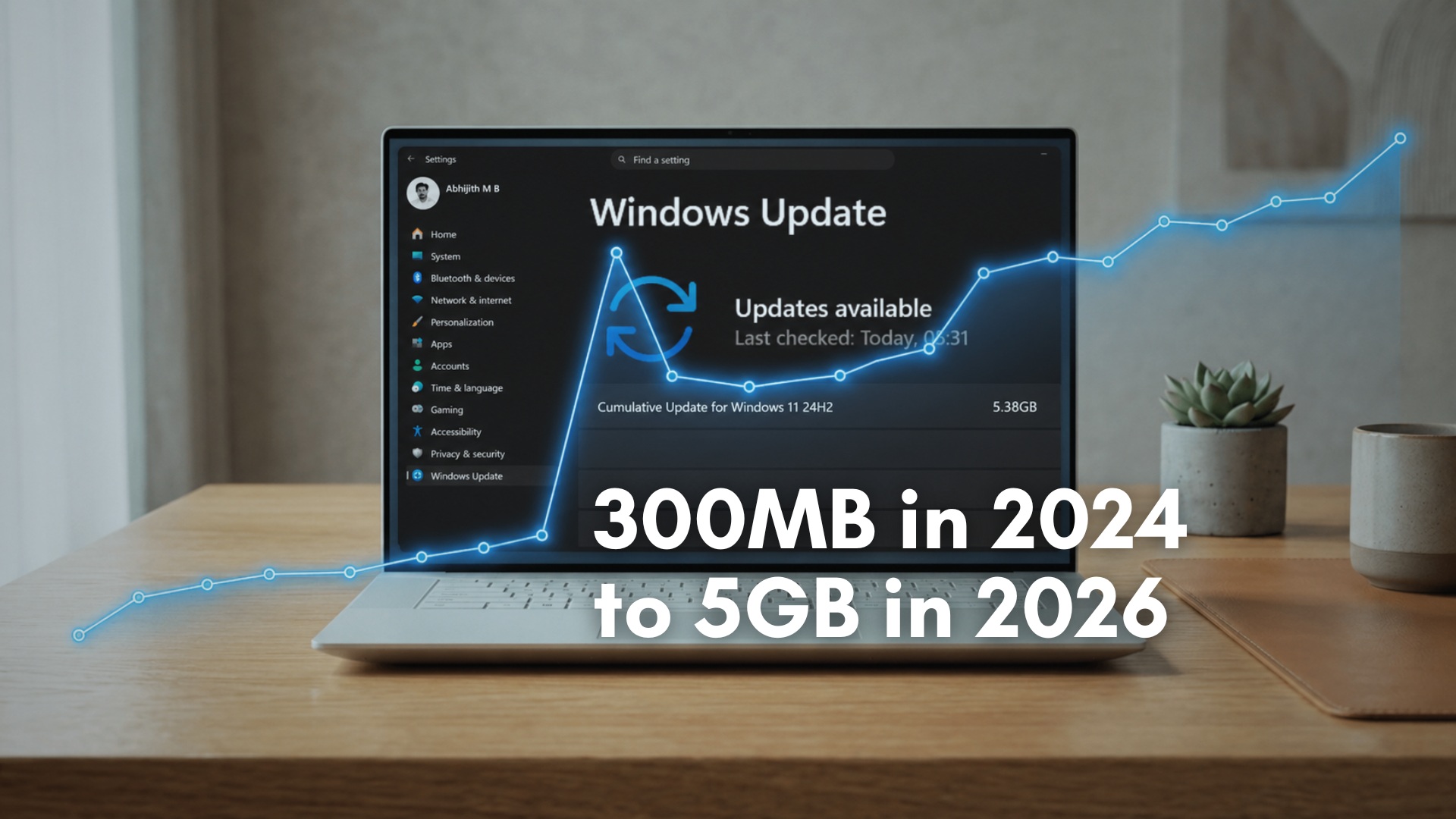
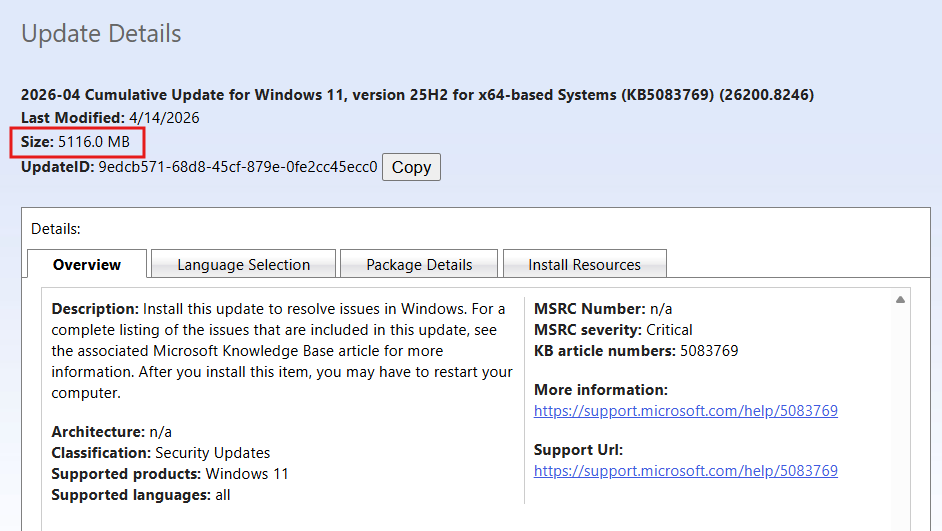
As it runs in the background, you might not have noticed it already, but Windows 11 updates are getting huge. Monthly cumulative updates downloaded via Update Catalog are now regularly crossing 4GB, and in recent cases, even touching 5GB. The numbers get even more absurd when you look at what’s inside those updates. Our analysis showed a cumulative update expanding to nearly 9GB once extracted!
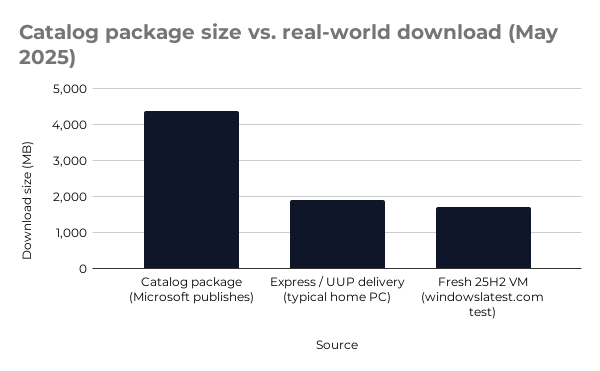
Note that this analysis is about the updates downloaded from the Microsoft Update Catalog, which is the original size of the update before it’s modified for your computer, depending on what hardware you have and which updates you’ve already installed. Windows Update applies hardware checks and pulls only the changed parts through Express updates and UUP. So, a 4GB catalog package can become a 1.5 to 2GB download at home.
Either way, the actual update sizes have increased drastically, and the obvious explanation people jump to is AI. Windows is adding Copilot, on-device models, semantic search, and everything around it. So naturally, it must be AI bloating updates.
We found that it’s only part of the story.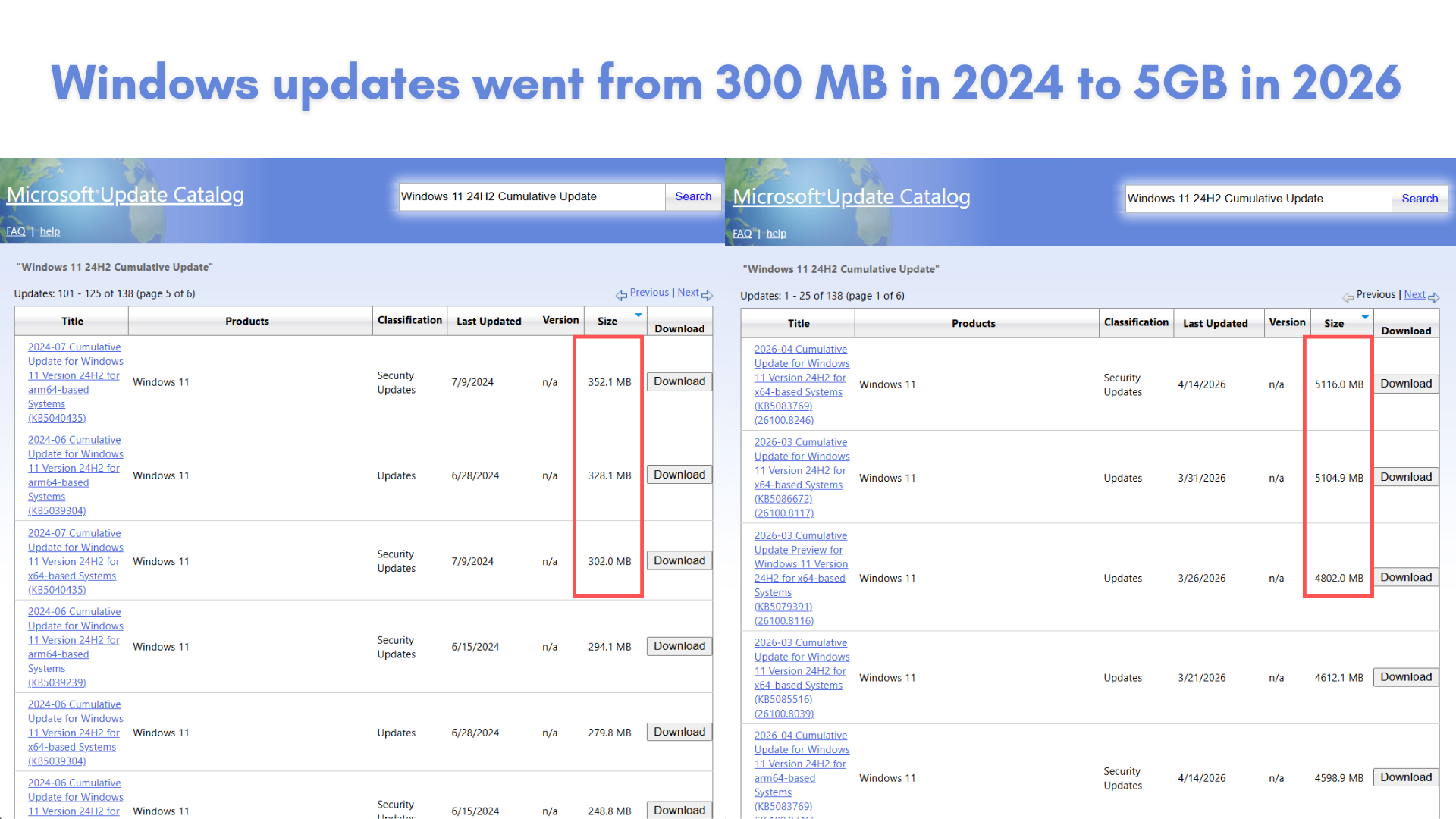 The real issue is how Windows updates are built and delivered. The size problem is about how new features are packaged, compressed, and distributed across millions of different systems.
I’ve always found it odd that an update that barely changes anything noticeable downloads gigabytes of data in the background. It’s also something to think of at a time when Storage is an expensive matter.
So, I did the research to find out why these Windows 11 updates are so big in the first place. And more importantly, can’t Microsoft just push updates only for the parts that change?
Why have Windows updates grown in size?
Microsoft doesn’t ship small, isolated patches anymore. We get the latest cumulative updates, also called LCUs.
So, the mandatory monthly security update (also called Patch Tuesday) includes everything. Not just the fixes from that month, but all previous fixes as well. If you install the latest update, your system is fully up to date, even if you skipped earlier ones.
It’s a clean model from a reliability standpoint. But the side effect is that updates can’t be small. They grow over time.
Even if your PC only needs a minor fix, the update package itself still carries the entire set of changes required to bring any system up to that version.
Microsoft tried to address this with Windows 11 24H2 through something called Checkpoint Cumulative Updates. Instead of building every update against the original RTM release, periodic “checkpoints” act as new baselines, and subsequent monthly updates only include changes since the last checkpoint, making them smaller and faster to install. Smart fix, on paper, at least.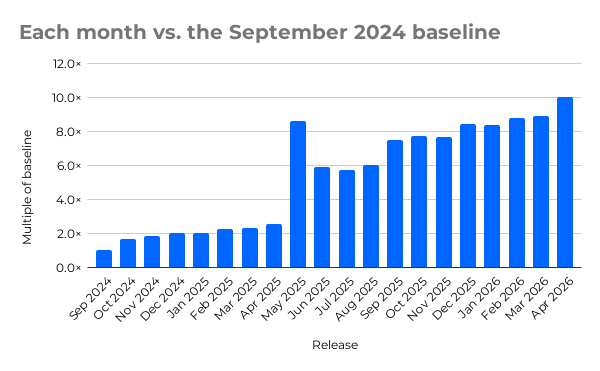
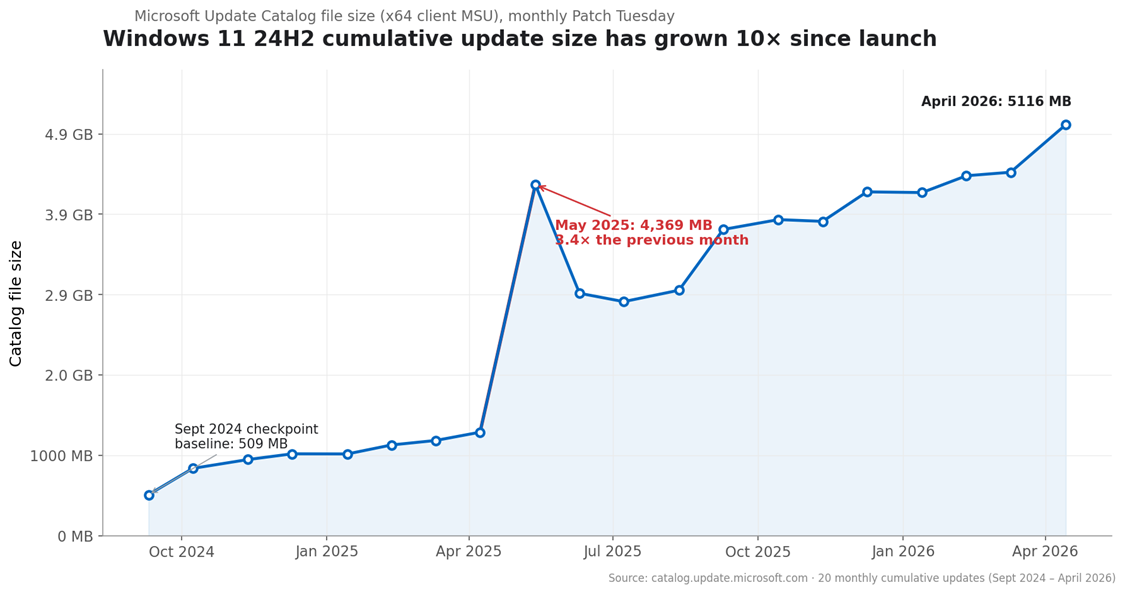
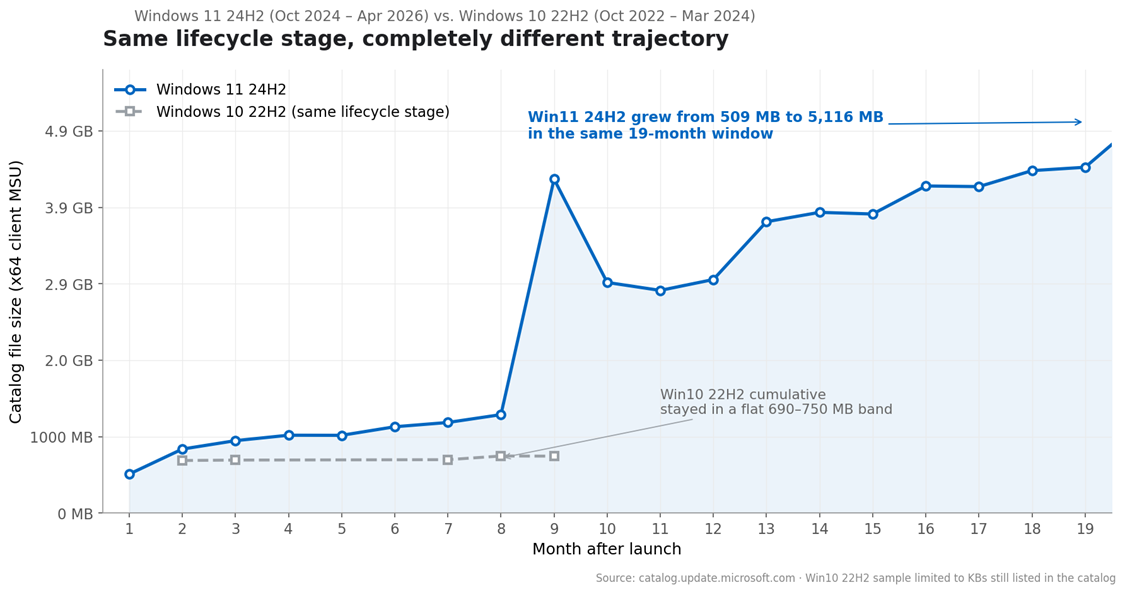
In practice, however, after a checkpoint was established in September 2024, updates were relatively small through April 2025. Then the May 2025 update nearly tripled in size, jumping to over 4GB in the catalog. A year later, there still hasn’t been a new checkpoint, which means the size savings Microsoft promised are quietly eroding.

Why Windows 11 May 2025 update tripled in size?

Looking more closely at the May 2025 cumulative update, the decompressed size jumped from around 6.5GB to nearly 9GB compared to April. What makes this unusual is that the compressed MSU file grew by roughly 3GB, while the decompressed file grew by only 2.5GB. Normally, compression makes the gap go the other way. The compressed file should always be smaller than the decompressed one, not larger in relative growth.
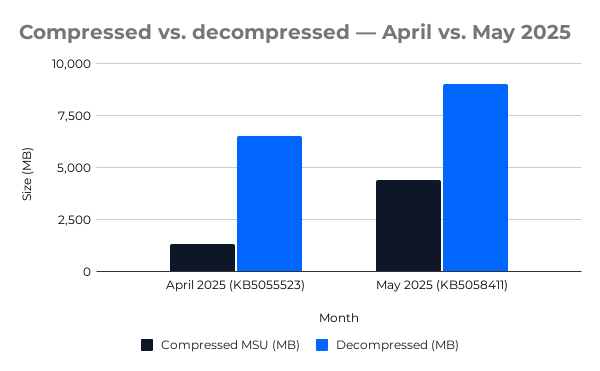
Windows updates contain tens of thousands of files, over 28,000 files in that single update. But none of the individual files stood out as unusually large. The top of the file size list was still the same msedge.dll from previous months.
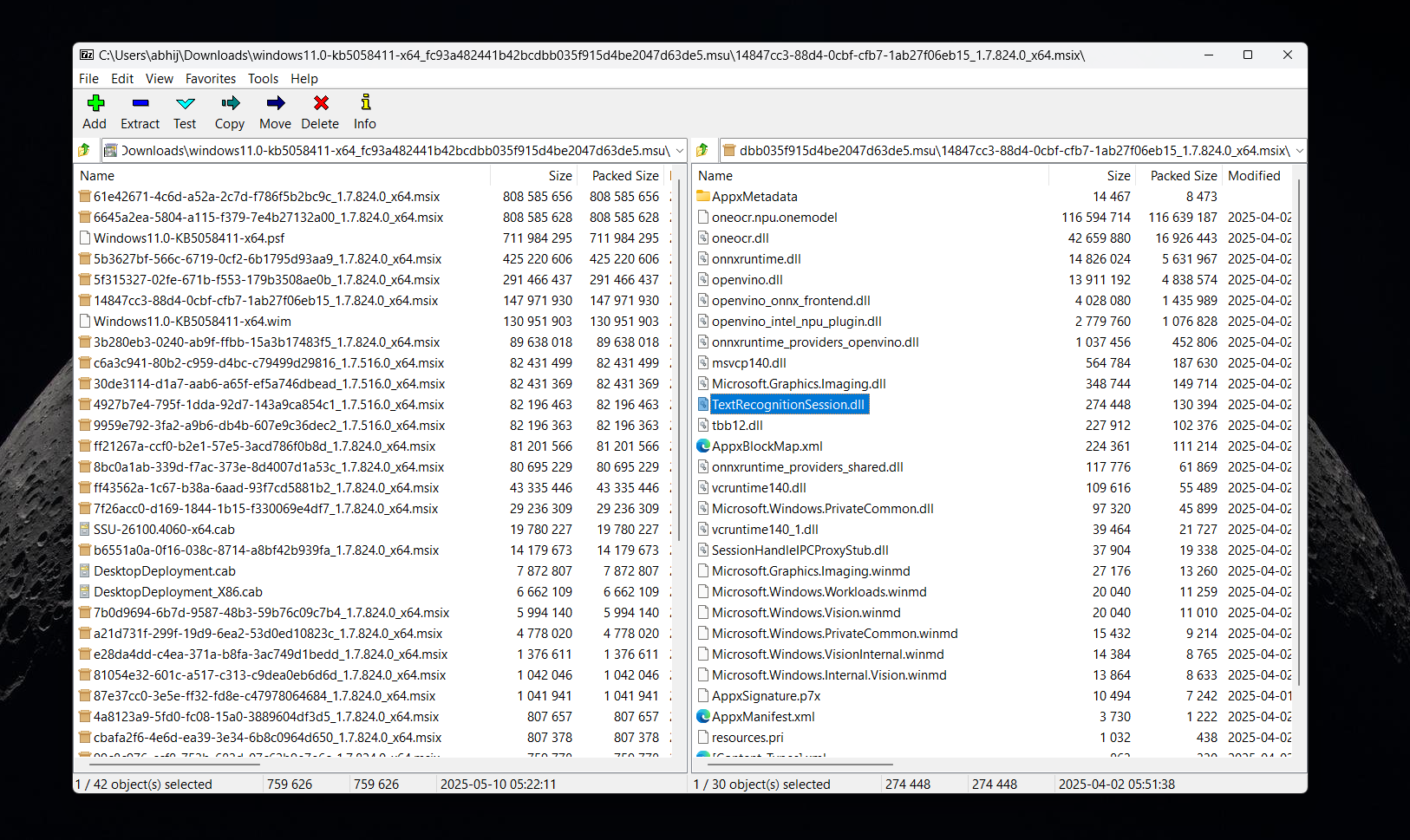
The April 2025 cumulative was 1,287 MB. May 2025 was 4,369 MB. Our 7-Zip extraction of the May package shows dozens of MSIX files that were not present in April, including PSTokenizer, Text Recognition Session, PSOnyxRuntime, Query Processor Session, and Image Search Session, which are all components related to semantic search and on-device AI, using the Onyx runtime that Microsoft has also released for developers. The ~3 GB delta is attributable to those bundled MSIX payloads.
So yes, AI is definitely a factor for the update size increase. But there is more to it…
AI is in the package, but not on your PC
Windows Update uses applicability logic. Before downloading anything, it checks your hardware configuration and only pulls what your system actually needs. A fresh Windows 11 25H2 install on a VM with no updates installed, exactly the worst case for a large download, ended up downloading only around 1.7GB from a 4GB+ catalog package, because the Semantic Search MSIX components didn’t apply to that machine.
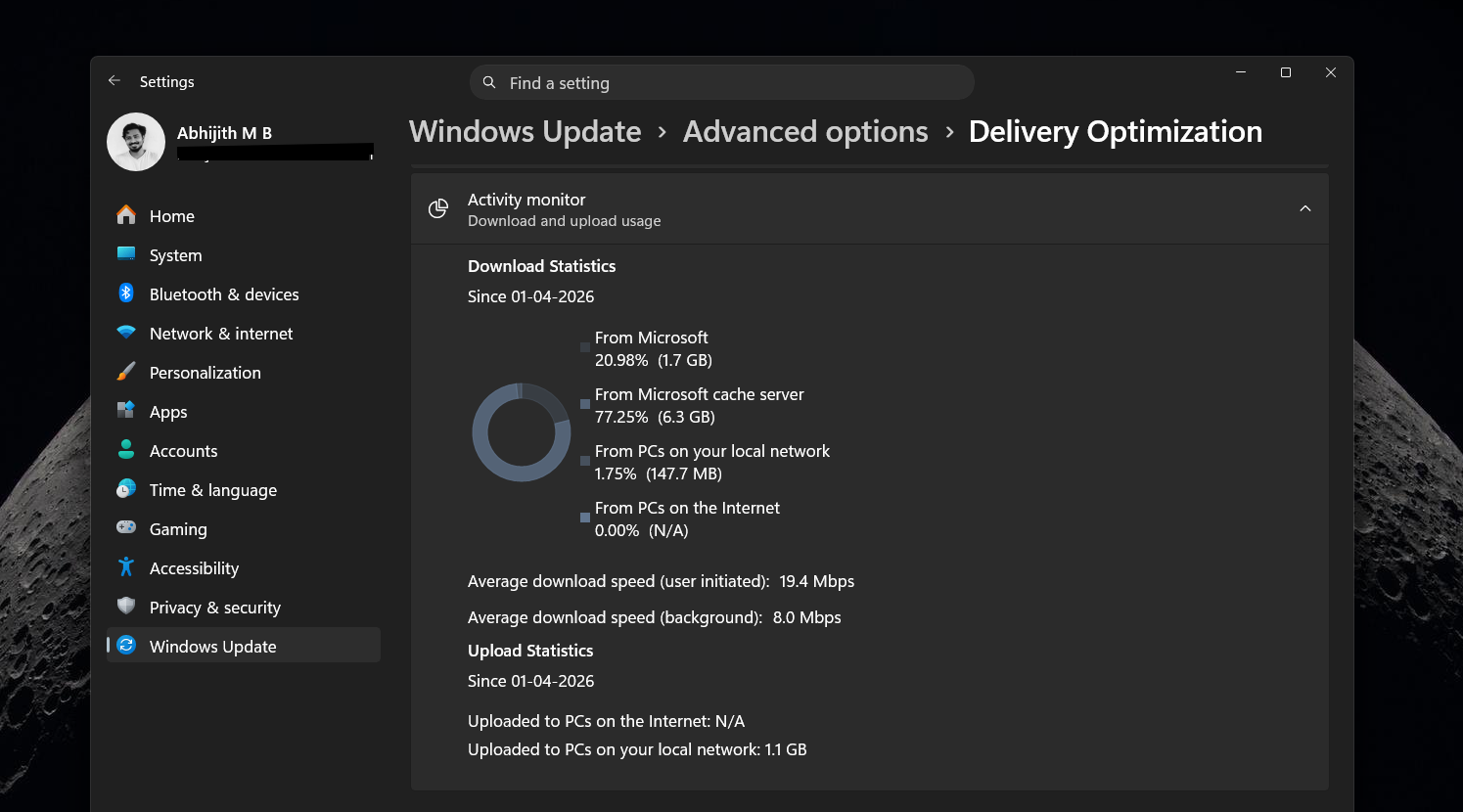
Looking at Delivery Optimization stats in Settings > Windows Update > Advanced options > Activity monitor confirms that the actual download size on real machines tends to be much smaller than what the Windows update catalog lists.
The Semantic Search components were initially built for Copilot+ PCs with Snapdragon NPUs. As support expanded to Intel and AMD systems, more variants got added to the package. Every expansion means more payloads in the bundle, even for machines that will never use those features.
Technically, this is solvable. AI models and Semantic Search components could be delivered through the Microsoft Store or as optional on-demand downloads, completely separate from the monthly cumulative update. Microsoft hasn’t done that yet, but they’re still shipping these components inside the main update pipeline.
Why can’t Microsoft just send exactly what changed in an update?
If Windows already knows what each system needs, why package everything together at all?
Differential updates already exist. Windows uses Express updates and the Unified Update Platform to pull only the changed portions of binaries rather than downloading entire files. A 3 to 4GB catalog entry may result in a 1.5 to 2GB download because of this. Microsoft is already minimizing what reaches your PC, but the inefficiency is in the package structure.
True modular updates are harder than they sound at the Windows scale (which is more than a billion users), with millions of hardware combinations, including different CPUs, GPUs, storage controllers, firmware versions, driver stacks, and legacy enterprise software. Every update has to be backward compatible, installable offline, and safe to deploy across thousands of machines without breaking anything. If a single dependency is missed or if it creates a component mismatch, the system can fail to boot.
There are also enterprise issues. WSUS downloads the full cumulative update every month. Configuration Manager distributes that same full package to every distribution point. Offline servicing tools inject complete MSU packages into system images. Every one of these scenarios needs the full package, even when an individual endpoint only uses a fraction of it. A home user might download 1.5GB, but an IT team managing thousands of machines is storing and distributing 4GB every month, per architecture.
Why Apple gets away with smaller updates
macOS incremental updates are typically in the 1 to 3GB range, with larger jumps reserved for major version releases. Apple controls the entire hardware stack, including CPUs, GPUs, drivers, and firmware. Older components can be dropped aggressively. Compatibility rules can be enforced strictly because the hardware variation is minimal compared to Windows.
Apple also doesn’t have a fixed monthly schedule. Updates ship when they’re ready, which allows more flexibility in how changes are bundled and what gets left for the next release.
Windows takes the opposite approach by prioritizing compatibility, predictability, and the ability to deploy across an enormous variety of hardware and software configurations.
What’s happening to Windows 11 updates in the enterprise infrastructure
For home users, the situation isn’t as bad as the catalog numbers suggest. Download sizes are much lower thanks to delta logic and applicability checks, which is why most people don’t notice the 3 to 4GB figure.
Enterprises don’t have that flexibility. Full packages get downloaded every month, stored across multiple distribution points, and pushed to endpoints regardless of what those endpoints need. Storage usage compounds quickly, especially when regular cleanup isn’t done. Distribution points push these packages across internal networks, and even with Delivery Optimization and peer-to-peer sharing, total data movement is significantly higher than it was two years ago. Compared to 2024, we are facing the worst memory crisis, and this isn’t a good sign for enterprises.
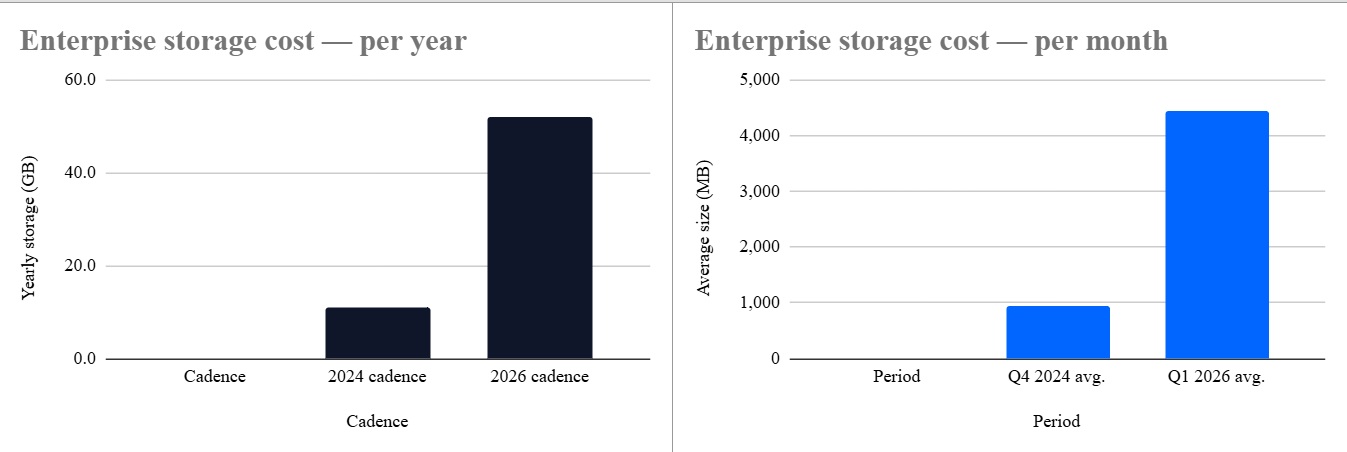
The yearly storage cost per architecture, per distribution point, has gone from roughly 11 GB (2024 cadence) to 52 GB (2026 cadence). For an org with even five distribution points, that is a quarter-terabyte of monthly update files sitting on disk per year, per architecture, without any cleanup.
Looking at 24H2 update sizes since launch, from around 200 to 500MB in mid 2024 to consistently 3 to 4GB by late 2025, the upward trend is clear and doesn’t look like it’s reversing anytime soon. Windows 10 went through a similar trajectory, just more slowly. Windows 11 is accelerating that pattern.
However, not all hope is lost, as Microsoft is taking efforts to reduce the download time for Windows updates, but we are not sure if it’s through size reduction.
How to check what your PC is downloading during an update
If you want to see the real download size rather than the catalog figure, go to Settings > Windows Update > Advanced options > Delivery Optimization > Activity monitor. It shows exactly how much data came from Microsoft, from local network peers, and from the cache.
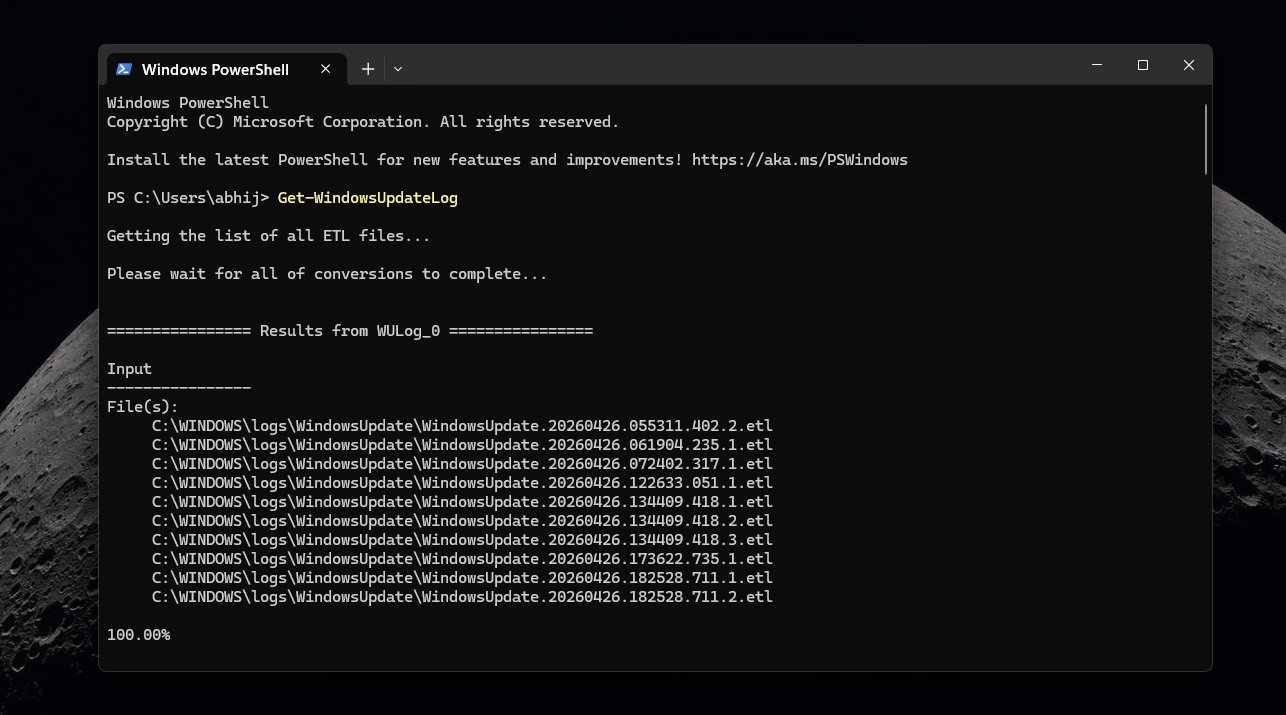
For more details, Event Viewer includes Windows Update logs, and running Get-WindowsUpdateLog in PowerShell generates a readable log file.
The gap between what the catalog lists and what your machine downloads is usually the clearest way to show that the problem is the package design.
Windows updates are big because they are built for reliability
Windows updates are large because they’re built to work everywhere, on every configuration, for every enterprise scenario. Microsoft is already minimizing what reaches your device, but the package itself keeps growing. Until AI components ship separately and a new checkpoint resets the baseline, Windows updates aren’t going to get smaller.